Why This Audit
As PNA's digital advertising partner, Wetpaint identified that the current website experience may be limiting campaign performance and customer conversion. This audit establishes where the website is falling short, whether the existing technology remains suitable, and what should be fixed, redesigned or measured before further investment.
Are customers being prevented from finding products and completing purchases, and where does the journey break?
Are the problems caused by WordPress/WooCommerce itself, or by UX, implementation, integrations and ongoing management?
Should PNA retain and improve the platform, selectively redevelop priority journeys, or consider replacement only if technical validation proves it necessary?
What the audit needed to achieve
The evidence at a glance
GA4 Events and Checkout Journey, 18 August 2026. Bars are scaled against website users, with a minimum visible width for non-zero stages; event de-duplication, tag coverage and a controlled purchase still require validation.
| What was tested | What remains open |
|---|---|
| Public and logged-in desktop/mobile journeys; product, category, cart and reachable checkout states; WordPress admin; GA4; GTM; Lighthouse; three competitors; sampled SEO, content and accessibility. | Controlled mobile and desktop purchases; payment failure and confirmation; hosting/security logs; product feed and inventory sync; backup/restore; full crawl; Search Console and Merchant Center validation. |
Audit Overview & Executive Decision
40 findings across four areas| Headline result | Decision |
|---|---|
| Platform verdict | Retain and optimise the current WordPress and WooCommerce platform. |
| Immediate concern | Customers arriving on the main site are not told that they must choose a store before they can buy, and the PostNet collection option fails during checkout. |
| Findings | 40 findings grouped into website experience; e-commerce and conversion; technical performance and measurement; and SEO, content and competitive position. |
| Recommended approach | Make store selection clear and unavoidable so customers can access a transactional store, fix or temporarily remove the broken PostNet collection option, then redesign the connected shopping journeys and establish reliable measurement for ongoing growth. |
- Add an unavoidable store-choice step before customers enter transactional browsing. Options are: clearly prompt for a store, route to the nearest store with an easy override, or enable central fulfilment after technical validation.
- Fix or temporarily remove the broken PostNet collection option.
- Verify that shopping actions and completed orders are recorded correctly, then reconcile the analytics totals with WooCommerce, payment-gateway and finance records.
- Navigation and information architecture.
- Homepage entry and store/shop choice.
- Category, search and filtering.
- Product-page and cart templates (design and front-end development).
- Checkout, delivery and payment connections (development and integration).
- Mobile and accessibility components.
- Multisite operations, platform maintenance and page-level SEO governance.
E-commerce Journey Audit
What we assessed: the customer journey from finding a product through product pages, cart, checkout, delivery, collection and stock communication on desktop and a 390-pixel mobile viewport. Live testing on 18 August 2026 reconfirmed that main-site products cannot enter the cart before store selection. A real order or payment was not submitted, so failed-payment recovery, order confirmation and post-purchase messages remain not tested.
| Journey requirement | Status | Disposition |
|---|---|---|
| Product discovery and product-page content | Verified | Category, search, filter, sort, product information, stock, CTA, fulfilment, related products and reviews assessed below. |
| Cart quantity, removal, promo code, costs, stock, add-ons and persistence | Partially verified | Reachable store-cart behaviour and existing evidence reviewed; persistence and reported delayed refresh need controlled reproduction. |
| Guest checkout and account requirements | Pending controlled order | Do not conclude until mobile and desktop checkout are completed without changing live configuration. |
| Delivery/collection, address, charges and store selection | Partially verified | Store pickup and the broken PostNet option are evidenced; real coverage, timing, split-order and inventory accuracy require order/operations data. |
| Payment methods and failed-payment recovery | Pending controlled order | Zapper-only evidence and missing card capability are documented; no financial transaction was attempted. |
| Order confirmation, email/SMS, tracking, returns and post-purchase support | Not tested | Complete after a successful controlled purchase; assess accuracy, timing, contact route and refund instructions. |
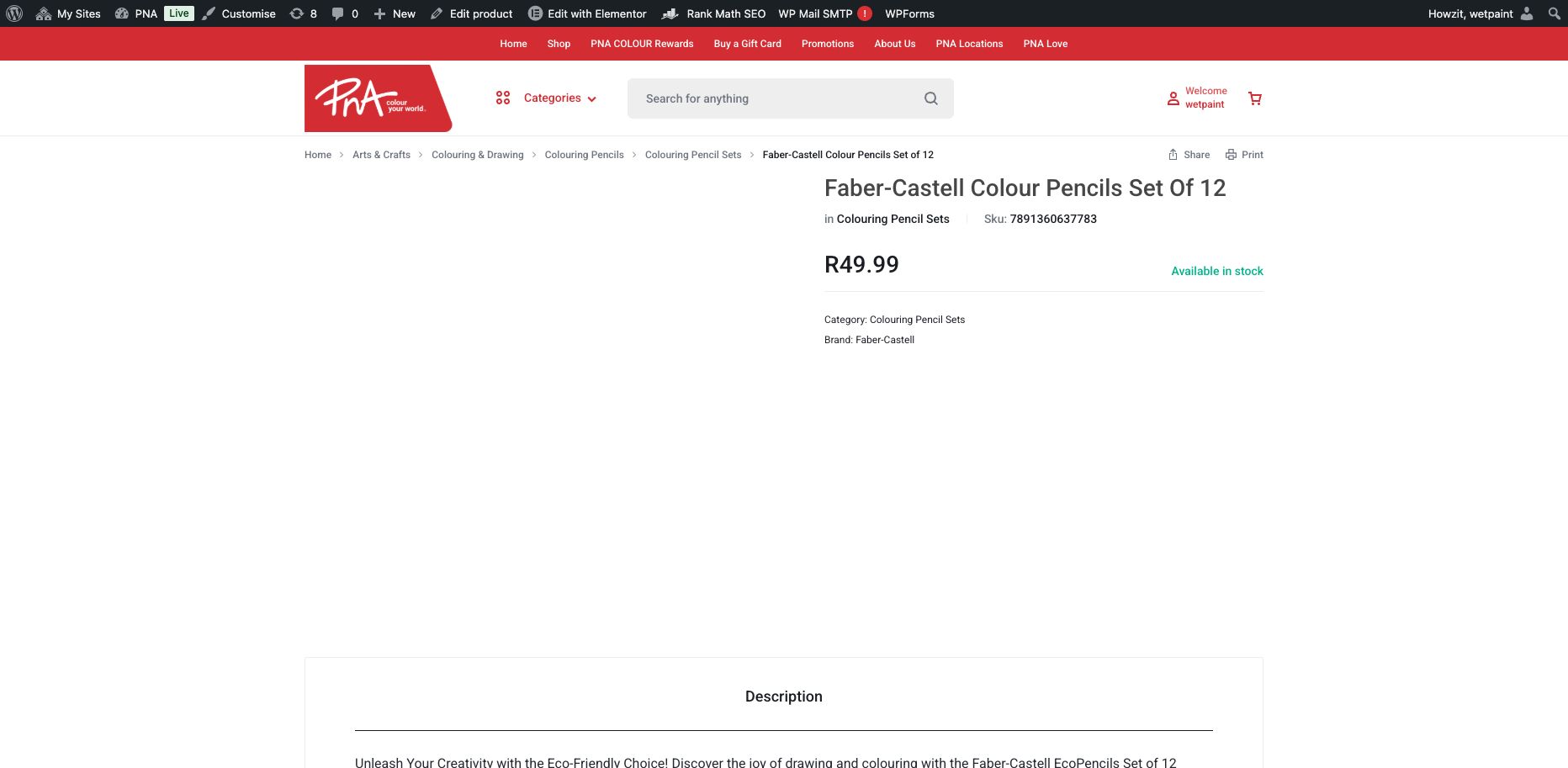
Evidence: the main product page cannot start a purchase
The product shows a price and “Available in stock,” but no quantity, Add to Cart or instruction to select a store. Store-specific pages do provide those controls, so this is a broken customer route—not proof that WooCommerce lacks the capability.
Business impact: customers arriving from the homepage, search or Google can reach a product and still have no clear way to buy it.
1Product Discovery
What we assessed: category structure, recommendations, featured and seasonal products, search results, filters, sorting, comparison and recently viewed items.
| Issue | What is not working | What should change | Severity |
|---|---|---|---|
| Unrelated categories appear while browsing | The PNA category sidebar surfaces unrelated choices such as technical-drawing and craft subcategories in shopping contexts where they do not belong. The taxonomy—the hierarchy and rules used to organise products—is mapped inconsistently, so shoppers have to interpret internal catalogue structure rather than useful retail choices. | Clean the product hierarchy, remove duplicate or misplaced categories and map every product to a consistent parent, subcategory and attribute set. Rebuild the sidebar from that cleaned structure. | High |
| No way to filter by price or stock availability | The full Filter & Sort panel offers Categories, Brands and Product Tag only. There is no price-range control and no "in stock only" toggle. Brand filtering and sorting by popularity, newest and price do work. | Add a price-range filter and an availability toggle to the existing filter panel — both are standard WooCommerce filter widgets. | Medium |
| No product comparison feature; no "recently viewed" module | There is no product-comparison control and no recently viewed module after browsing several products. | Consider adding a lightweight recently-viewed module (low-effort, works well for a repeat-visit stationery/back-to-school shopper); product comparison is a bigger build and can be deprioritised. | Low |
- Category browsing otherwise behaves as expected for a standard WooCommerce/Motta catalogue.
- Featured products and seasonal content exist, but campaign-expiry governance is inconsistent; the Content and Merchandising section contains the full finding and recommendation.
2Product Pages
What we assessed: product information, images, price, stock, purchase controls, fulfilment information, related products and reviews. The main site and a store-specific product page were compared to separate the platform capability from the implementation problem.
| Issue | What is not working | What should change | Severity |
|---|---|---|---|
| Store selection is required but not explained | Main-site product pages are the pages reached from the homepage and search engines, yet they never explain that a customer must choose a specific PNA store before buying. Root cause: the WordPress network contains a main catalogue plus separate transactional store sites; the customer-facing route between them is missing. | Add an unavoidable store-choice step at the start of shopping, remember the selection and keep a visible "change store" control. In parallel, validate whether central fulfilment or reliable nearest-store routing is the more maintainable long-term model. | Critical View screenshot → |
| Main-site products show stock but no Add to Cart or quantity | Products opened from the homepage or main catalogue show a price and "Available in stock" but no quantity selector and no Add to Cart button. Live logged-in testing reconfirmed this on 18 August 2026. Store-specific product pages do show those controls, proving the theme and WooCommerce can support them. | Until the permanent routing model is implemented, replace the missing purchase area with a clear "Choose a store to buy" action. After selection, expose quantity, stock and Add to Cart in the same predictable position on every product page. | Critical |
| Mobile cart icon is tiny and performs a different action | The icon over product cards looks like quick add, but opens the product page as "Read more." On a 390-pixel viewport it measured about 20×21 px, less than half the recommended 44×44 px minimum tap area, and its accessible name does not match the cart symbol. | Either make it a real Add to Cart control after store selection, or replace the cart symbol with a clearly labelled "View product" action. Increase the interactive area to at least 44×44 px and align the visible icon, label and screen-reader name. | High |
| No delivery/collection information or expected delivery timing shown | Product pages show price and stock status only — no delivery options, collection options, or expected delivery timing anywhere on the page. | Add delivery/collection information and estimated timing to the product page template. | Medium |
| Product descriptions read as unedited, comma-spliced copy | Description text runs sentences together with commas instead of full stops, e.g. "Achieve Dramatic Contrast with the Faber-Castell Goldfaber Grade 2B Pencil, Unlock deep shadows..." — repeats across listings. | Run a copy pass over bulk-generated descriptions; set a consistent format template for future imports. | Medium |
| No reviews or ratings displayed | No product reviews or star ratings appear on any product page checked. | Consider enabling verified product reviews and include valid review information in Product structured data so customer trust and search-result eligibility improve together. | Low |
- Clear product name, product images, and stock availability all check out on every product page reviewed.
- Specifications are folded into paragraph copy rather than a separate structured list, making products harder to compare.
- No promotional/"was-now" pricing was found on any product checked, so promo-price display couldn't be verified either way.
3Cart Experience
What we assessed: quantity changes, removal, saved-cart behaviour, discount-code entry, delivery-cost visibility, stock alerts, add-on recommendations and persistence.
| Issue | What is not working | What should change | Severity |
|---|---|---|---|
| Cart totals and item states can update late | A later review reported that products added, removed or changed in quantity do not always appear immediately and may require a manual refresh. This was not independently reproduced during the latest read-only check, so it should be treated as a reported synchronisation defect pending the controlled purchase-path test. | Reproduce across representative store sites and devices, then inspect WooCommerce AJAX requests, caching, sessions and cart-fragment synchronisation. Add regression tests covering add, remove, quantity, subtotal and cart-badge updates before release. | High |
| No promo-code field or cross-sell/add-on prompts in the cart | Store-specific carts expose quantity and removal controls, but their immediate synchronisation still requires validation. Separately, the cart has no promotional-code field and no "you might also need" or add-on suggestions. | Add a promo-code field to the cart page, and a small cross-sell module (e.g. "complete the set" for stationery bundles) — both are standard WooCommerce cart features. | Medium |
| No delivery-cost visibility until checkout | The cart page's "Estimated total" only ever shows the product subtotal and VAT — delivery cost only appears once you reach checkout and pick a delivery method. | Show an estimated delivery range and the full likely order cost in the cart. Baymard's 2025 quantitative research found 12% of abandoners could not see the total cost before checkout and 40% left because extra costs were too high, making early cost visibility a conversion requirement rather than a cosmetic improvement. | Low |
Research source: Baymard Institute, e-commerce UX statistics (2025 data).
Not tested because the main-site purchase path could not place an item in the cart during the 18 August validation:
- Independent reproduction of the reported delayed cart updates during the controlled purchase-path test.
- Saved-cart functionality (does the cart survive closing the browser, or logging out and back in?)
- Stock-alert messaging for low/limited stock.
- Cart persistence across sessions.
4Checkout Experience
What we assessed: contact details, delivery and collection, address entry, charges, payment choices, mobile layout, errors and support access. No real order or payment was submitted.
| Issue | What is not working | What should change | Severity |
|---|---|---|---|
| Default delivery option fails with a store-loading error | Checkout's cheapest "Ship" option, "Collect at PostNet" (R69), requires picking a PostNet branch — but the store list fails to load: "Error loading stores: Invalid store data received." Clicking Retry does not resolve it. This blocks checkout completely for anyone who selects the default/cheapest shipping method. | Test the available PostNet update from 1.0.14 to 1.0.15 safely in staging, validate compatibility and the API/store-data response, and then repair configuration or custom code as required. Until the complete checkout path passes, hide "Collect at PostNet" rather than offering an option that cannot be completed. | Critical View screenshot → |
| Standard card payment is unavailable | The only payment option at checkout is Zapper (a QR-code mobile payment app) — no card, EFT, or other option is shown once shipping is selected. This directly contradicts the site's own footer, which is present on every single page: it reads "Secure Payment — pay with popular and secure payment methods" and displays Visa and Mastercard logos site-wide. A customer sees card-payment signage on every page, then can't actually pay by card. That's not just a missing feature — it's a trust signal the site can't back up. | Add a conventional card-payment gateway and test Visa/Mastercard completion, decline handling and recovery. Until it works, remove the card logos and rewrite the footer so it does not advertise an unavailable payment method. | Critical |
| Delivery cost is disproportionate for small orders | Shipping a single R12.99 pencil costs R69 (PostNet collect, once fixed) or R170 (PostNet door delivery) — up to 13× the item's value. "Pickup in Store" at the previously-selected store is free and worked cleanly, but is the only economical option for a small single-item order. | Consider a minimum-order threshold for paid shipping, or surface "Pickup in Store" more prominently as the default for low-value baskets. | Medium |
What did work well:
- Contact details pre-filled from the logged-in account.
- A clean, low-friction checkout (contact → delivery → payment on essentially one flow, not a long multi-page wizard).
- A clean toggle between "Ship" and "Pickup in Store" — "Pickup in Store" itself was free, fast and error-free.
- The Help Center link is present in the footer throughout checkout, so support access is at least reachable.
Testing status: the homepage and product journey were retested at 390×844 px. Guest checkout, failed-payment recovery, order confirmation and confirmation email/SMS remain not tested because the main-site journey could not add a product and a real transaction was outside this non-destructive audit. These are Phase 1 acceptance tests before launch.
5Delivery, Collection and Stock
What we assessed: delivery areas, fees and timing; collection and store selection; stock handling; tracking, returns and post-purchase communication.
- Broken PostNet collection: the default low-cost option fails to load branch data. Fix the integration or hide the option until it passes testing.
- Cost shown too late: delivery charges appear only at checkout and can exceed a low-value basket. Show an estimate on product pages and in the cart, with free pickup made prominent.
- No delivery promise on product pages: customers cannot see an expected date before checkout. Add delivery/collection choices and timing beside the purchase controls.
- Unverified edge cases: out-of-stock substitutions, split orders, tracking, refunds and post-purchase messages require controlled end-to-end orders before release.
- After a store is selected, store-specific stock counts and free pickup are available.
- The footer states nationwide coverage through 140+ stores.
- Return-policy and order-tracking links are present, although the operational journey still needs a completed-order test.
Product Page Comparison: PNA vs Waltons
A direct, like-for-like comparison: a PNA product page at a store-scoped URL (/clearwater-mall/product/... — already past the store-selection gate, so this is PNA's best-case page) against a comparable stationery item on Waltons, a similar South African office/stationery retailer. Both captured live on 14 August 2026. This is a separate question from the store-gating Critical finding above: even once a PNA visitor clears that gate, how does the page itself compare on features a shopper would expect?

PNA · pna.co.za/clearwater-mall/product/croxley-colour-pencil-wood-free-set-of-14/ · store-scoped, authenticated session · 14 Aug 2026.

Waltons · waltons.co.za · Monami Wax Crayons Retractable Assorted (Pack 12) · 14 Aug 2026.
| Feature on the product page | Waltons | PNA |
|---|---|---|
| Delivery time estimate shown on the page | ✓ | ✗ |
| Store/stock availability check ("How to get it" box, check stock nearby) | ✓ | ✗ |
| Wishlist / save for later | ✓ | ✗ |
| Cross-sell bundle with one-click "add selected to cart" | ✓ | ✗ |
| Genuinely related "similar products" (same category) | ✓ | ✗ |
| Rich, multi-paragraph product description | ✓ | ✗ |
| Dedicated specifications section | ✓ | ✗ |
| Customer reviews | ✓ | ✗ |
| Product-page FAQ (delivery, returns, VAT, B2B, etc.) | ✓ | ✗ |
| Transparency note on how recommendations are generated | ✓ | ✗ |
| Persistent utility bar (store locator, track order, delivery promise) | ✓ | ✗ |
| Third-party trust signal visible sitewide (e.g. review-platform rating) | ✓ | ✗ |
- The last two rows draw on the full-page captures rather than the crops shown above — Waltons' Trustpilot rating (4.3, 1,390+ reviews) sits in its footer, and its store-locator/delivery-promise bar runs above the main navigation sitewide.
- To be fair to PNA: its stock figure ("47 in stock") is more precise than Waltons' generic "In Stock," and its breadcrumb is arguably just as clean. Everything else in this table is a genuine feature gap, not a style difference.
- This is one product-page pairing rather than a full parity audit. Its findings have been incorporated into the standalone competitor benchmark.
Findings and Priority Scorecard
Scores reflect what this audit could directly observe. Where a genuine score requires access we don't have, it's marked "Not measured" rather than guessed.
View screenshots for the Critical findings →
| Area | Score | Risk | Key issue | Opportunity |
|---|---|---|---|---|
| Brand experience | 5/10 | High | Visual brand compliance is strong, but the value proposition isn't stated in one clear line and shopping vs. store-finding aren't presented as the two primary choices. | A single above-the-fold statement and clearer primary CTAs lift first impression with no visual redesign needed. |
| Navigation | 4/10 | High | The main menu mixes ten-plus unrelated items at the same level, "Shop my School" exposes a broken shortcode, the Categories menu mixes departments with very specific product types, and filters show duplicate or unrelated subcategories. Breadcrumbs and click depth work well, as does the store locator. | Reorganise the information architecture—the labels and hierarchy customers use to find content—into a short task-based menu. Clean the category structure and make "Shop Online" and "Find a Store" persistent primary choices. |
| Mobile usability | 3/10 | High | The responsive layout itself is generally clear, but the score is held at 3/10 because the central buying failure is identical on mobile and the cart-shaped product control is only about 20×21 px, opens "Read more" instead of adding to cart, and is far below a 44×44 px tap target. | Preserve the clean responsive layout, but rebuild the shared mobile shopping controls: store choice, product-card action, search/filter interaction and accessible tap areas. |
| Product discovery | 4/10 | Medium | Search over-weights partial matches, has no predictive suggestions or spelling tolerance, and offers no recovery from zero results. The product hierarchy is inconsistent and filters omit price and availability. Brand filtering and sorting do work. | A dedicated search-relevance plugin/config (covers relevance, predictive suggestions and spelling tolerance in one move) plus a taxonomy fix and a price/availability filter are contained, high-value work. |
| Accessibility | 4/10 | High | Keyboard users receive no visible focus indicator—the outline showing which link or control will activate when Enter is pressed. Rotating banners also lack useful image descriptions, and several mobile controls have undersized tap areas. | Add a strong visible focus style, meaningful banner alternative text and at least 44×44 px tap areas in shared components. Retest against Web Content Accessibility Guidelines (WCAG) 2.2. |
| Product pages | 3/10 | Critical | Products reached from the homepage or search engines show price and stock but no quantity or Add to Cart. Store-specific versions work, so the missing customer route between the main catalogue and each transactional store is the failure. | Immediately add "Choose a store to buy," then implement the agreed long-term routing or central-fulfilment model in the shared product template. |
| Cart and checkout | 3/10 | Critical | Store-specific cart capability exists, but delayed cart-state updates have been reported; the default/cheapest checkout delivery option ("Collect at PostNet") fails outright, and only one payment method (Zapper) is offered. | Reproduce and repair cart synchronisation, safely test the available PostNet plugin update in staging, fix the store-data error and add a card payment option. |
| Delivery and collection | 5/10 | Medium | Store-level stock and free pickup work. Shipped delivery is undermined by the broken PostNet option, high fees for small orders and no product-page delivery promise. | Repair PostNet, disclose cost and timing earlier, and make free pickup prominent for low-value baskets. |
| Content, SEO & merchandising | 5/10 | High | Product pages carry no structured data; many published pages have no Rank Math focus keyword or score and inconsistent schema; internal Motta builder types are included in the sitemap; and expired campaign content remains live. | Run a page-level SEO programme, clean the public URL and sitemap inventory, and establish campaign-expiry and content-governance ownership. |
| Technical performance | 5/10 | High | A Lighthouse lab test found severe mobile loading delay. The 157-site network is actively changing, earlier Bryanston evidence recorded intermittent 503 resource failures, and the admin area shows a core/plugin maintenance backlog and inactive Motta dependencies. | Prioritise mobile loading, then introduce representative-store monitoring, staged maintenance, dependency validation and regression testing across shared templates. |
| Tracking | Not fully measured | High | The front end loads 15+ overlapping measurement scripts. On 18 August, GA4 recorded view_item, add_to_cart and begin_checkout activity but no delivery, payment or purchase events. GTM labels container quality “Urgent” because some pages are untagged and additional detected domains are not configured. | Complete tag and cross-domain coverage, validate event de-duplication and parameters in Tag Assistant, remove duplicate scripts, submit controlled desktop/mobile orders and reconcile GA4 against WooCommerce, the payment gateway and finance. |
| Conversion effectiveness | Not reliably measured | Critical | The 18 August data records a steep fall from 557 product viewers to 16 add-to-cart users and 9 users beginning checkout, with no delivery, payment or purchase completion. The exact rates remain provisional because tag coverage and de-duplication are not yet validated and the live checkout cannot yet be verified through payment. Independently, the generic purchase path and PostNet option remain obstructed. | Fix the purchase-path blockers and measurement implementation together, then complete the pending test order, reconcile transactions and establish a trustworthy 28-day conversion baseline before using the figures for commercial decisions. |
Key Website Experience Findings
We assessed the customer-facing experience, e-commerce journey, technical performance and measurement, and the site's search visibility and retail content. These cards highlight the issues with the greatest customer or business impact. The linked evidence pages contain every finding, recommendation and test limitation for each grouped area.
- The value proposition isn't stated in one clear line, and the main menu mixes ten-plus unrelated items at the same level.
- “Shop my School,” a flagship nav item, loads a raw, broken shortcode instead of a page.
- Mobile inherits the unexplained store-selection requirement on product pages.
- The cart-shaped product-card control is only about 20×21 px, appears over the product image and opens "Read more" rather than adding the item.
- Search over-weights partial matches, has no predictive suggestions and zero spelling tolerance, and zero-result queries are a dead end.
- No visible keyboard-focus indicator shows keyboard users which control will activate next.
- Rotating banners lack useful image descriptions.
- Several mobile controls are smaller than a comfortable 44×44 px tap area.
- On 18 August, Lighthouse scored mobile Performance 54 and Accessibility 78; desktop scored 80 and 82.
- Mobile Largest Contentful Paint was 25.2s against a good threshold of 2.5s or less; desktop was 2.0s.
- The network has grown to 157 sites; intermittent Bryanston failures, outstanding core/plugin updates and inactive Motta dependencies require representative-store governance and staged maintenance.
- A single homepage load fires 15+ overlapping tracking scripts, including duplicate Facebook and TikTok pixels.
- GA4 now records product-view, add-to-cart and checkout activity, but no delivery, payment or purchase completion; Checkout Journey splits 9 checkout users between desktop (5) and mobile (4).
- GTM reports “Urgent” container quality because some pages are untagged and additional detected domains need configuration; WordPress Site Health reports two critical and four recommended issues.
- Product pages carry no structured data; many published pages have no Rank Math score or focus keyword; and internal Motta builder types are currently included in the public sitemap.
- An expired “Mid-Year Back to School Savings” campaign is still being served as current across four site entry points, weeks after it ended.
- Against three competitors, Waltons is the strongest e-commerce comparator — useful context for how far a fixed PNA site needs to go.
Wetpaint's Recommended Solution
Retain where possible
- WordPress and WooCommerce.
- The existing product catalogue and working store locator.
- Existing WooCommerce cart capability and free in-store pickup, subject to cart-synchronisation validation.
- Existing breadcrumbs, brand filtering and sorting.
- Content pages with no material usability problem.
Redesign or redevelop as connected workstreams
- Header and navigation: task-based information architecture with clear Shop Online and Find a Store actions.
- Homepage entry: make nearest-store shopping explicit and explain whether the customer is browsing the national catalogue or a selected store.
- Category, search and filtering: correct taxonomy and improve relevance, price and availability controls.
- Product-page template: make the route to purchase, store selection, stock and delivery expectations unambiguous.
- Cart design: expose cost, quantity, promotional codes and relevant add-ons clearly.
- Checkout development and integration: repair PostNet, add standard card payment and test error recovery and confirmation.
- Mobile and accessibility system: correct shared interaction, focus, labelling and responsive behaviour.
- Campaign and merchandising framework: reusable landing templates, bundles and expiry governance.
- Platform operations and SEO governance: representative-store QA, controlled maintenance, sitemap hygiene and page-level optimisation.
- Establish a small reusable design system and rebuild shared templates instead of editing pages individually.
- Correct the underlying category and product-data structure.
- Review plugin, script and tracking duplication before adding more tooling.
- Use a controlled maintenance process covering staging, backups, compatibility checks, rollback and release approval across the Multisite network.
- Develop and test in a staging environment, with representative-store regression tests covering product, search, cart, checkout and shared templates.
- Document integrations and custom functionality, and assign named ownership for campaigns, content, analytics and website QA.
Recommended solution by brief pillar
| Pillar | Recommended actions |
|---|---|
| Website & UX |
|
| E-commerce |
|
| Data & Performance |
|
| SEO & Content |
|
| Platform governance |
|
Future Site Growth Opportunities
These are opportunities to grow and improve PNA's digital retail experience after the transaction path and measurement baseline are stable. Prioritise them using customer evidence, commercial value, delivery cost and operating complexity.
| Opportunity | Why it fits PNA specifically | Relative effort |
|---|---|---|
| Turn "Shop my School" into a real class-list shopping tool | Once the broken shortcode above is fixed, this is a natural place to go further: let a parent search their child's school and get a pre-built, editable list they can add to cart in one click. This is a proven back-to-school conversion driver at other SA retailers and plays directly to PNA's core seasonal business. | Medium–High |
| Surface COLOUR Rewards status for logged-in members | The header shows "Welcome [username]" with no points balance, tier or reward visible anywhere, even though PNA COLOUR Rewards is actively marketed as a "Free Rewards Programme" with member-only offers. Showing balance at a glance turns the loyalty programme from a one-time sign-up page into an ongoing reason to come back. | Low–Medium |
| Build "Bundles" as a real feature, not a campaign image | The homepage already promises "Save on selected School Bundles" — right now that leads to a static promotional graphic. A genuine bundle tool (pick a bundle, add every item to cart in one action, at a bundle price) would deliver on that promise and lift basket size in exactly the season PNA cares most about. | Medium |
| Add a wishlist / save-for-later | Parents typically build a school-supply list gradually, often across more than one visit or device. A wishlist (with an optional email reminder) matches that real shopping behaviour and is a standard, low-cost WooCommerce addition. | Low |
| Default to the nearest store instead of requiring a manual pick | This directly addresses the Critical store-gating finding, but it's worth framing as an enhancement, not just a fix: defaulting to the nearest store by IP/geolocation (with an easy "not your store?" override) removes the extra step entirely for most visitors, rather than just labelling it better. | Medium |
| Add live chat or an AI shopping assistant | Today, support is phone, email or WhatsApp only. A chat widget would reduce load on the Help Center and could also proactively explain the store-selection step to a confused first-time visitor — turning a support channel into a conversion-recovery tool. | Low–Medium |
| Add locally-popular payment options alongside card | Beyond fixing the Zapper-only gap with a card gateway, consider adding a buy-now-pay-later option popular in South Africa (e.g. PayJustNow, Happy Pay) — a natural fit for bulk back-to-school spend, which can be a meaningful once-off cost for a family. | Medium |
| Put the existing tracking investment to work on-site, not just off-site | The site already loads 15+ tracking scripts for outbound retargeting. Once duplication and consent are resolved, validated behavioural data could also support useful on-site personalisation such as "based on what you've viewed." | Medium–High |
Two further ideas worth a closer look but not fully scoped here:
- A lightweight installable/PWA experience for mobile, given how repeat-driven stationery shopping is across school terms.
- A proper language toggle rather than one-off Afrikaans campaign pages (the "PNA Love" menu includes "Skool met die Grootste Gees" alongside English-only site chrome) — worth confirming whether this is a business priority first.
Implementation Roadmap
A three-phase improvement programme, with technical validation and measurement beginning on day one. Timing is indicative and should be confirmed after access, architecture and integration discovery.
Phase 1 · Stabilise transactions
Days 1–14Contain the visible purchase-path failures immediately while the permanent architecture and integration decisions are validated.
- Contain: add a persistent store-selection prompt on generic shopping journeys; fix or temporarily remove the broken PostNet collection option; repair or remove the broken “Shop my School” destination.
- Validate: review the 157-site Multisite architecture, fulfilment routing, inventory dependencies, payment configuration, hosting, security and maintainability. Test a representative sample rather than relying on one working store.
- Maintain safely: create a staging update plan with backups and rollback; validate the inactive Motta dependencies; test PostNet 1.0.15 before custom redevelopment; and establish 5xx/asset monitoring.
- Measure: resolve GTM's untagged-page and additional-domain diagnostics; validate the e-commerce data layer and duplicate events; secure payment-gateway and transaction-record access; reconcile GA4, WooCommerce, gateway and financial records.
- Test: complete controlled mobile and desktop purchases, including guest checkout, delivery, payment, confirmation and post-purchase communication.
Phase 2 · Redesign priority journeys
Indicatively weeks 3–8Proceed once the Phase 1 technical decision establishes how the Main site, store subsites, inventory and fulfilment should work together.
- Redesign the header, task-based navigation, homepage entry and Shop Online / Find a Store choice.
- Correct taxonomy and rebuild category, search and filtering patterns, including useful result-card details and stock status.
- Rebuild shared product-page, cart and checkout templates around the validated fulfilment model; resolve cart synchronisation and test updates without manual refresh.
- Introduce the agreed payment options and align all payment claims with actual checkout capability.
- Correct mobile interaction, keyboard focus, labels, alternative text and shared accessibility behaviour.
- Create reusable campaign and merchandising templates with expiry controls.
- Integrate gift cards into the main journey where practical, or make the external hand-off, account messaging and return journey seamless.
Phase 3 · Build for growth
Month 3 onwardOptimise only after the transaction path and measurement baseline are trustworthy.
- Complete page-by-page SEO optimisation, Product structured data, canonical/schema review, sitemap cleanup and campaign landing-page standards.
- Introduce cross-selling, bundles and other opportunities only where validated against customer and commercial needs.
- Maintain a conversion dashboard covering the validated funnel, device, source, search and fulfilment journeys.
- Run a prioritised experimentation and optimisation programme against agreed performance indicators.
- Establish a merchandising calendar, a 157-site ownership/register process, representative-store release QA, regression testing and named ownership for ongoing site quality.
Director Brief Coverage
Requirement-by-requirement dispositionThis matrix maps every requested audit area to a result, evidence source and completion status. It prevents an untested item from being mistaken for a pass and keeps the remaining PNA, IT and transaction inputs visible.
| Brief area | Status | Items covered, result and evidence | What remains |
|---|---|---|---|
| First impression & brand | Verified |
|
Retest the revised homepage and campaign framework after implementation. |
| Navigation & information architecture | Verified |
|
Tree testing with representative customers after the proposed information architecture is drafted. |
| Mobile experience | Partially verified |
|
Complete a mobile transaction to verify checkout fields, validation, overlays, sticky controls and post-purchase messaging. |
| On-site search | Partially verified |
|
Expose the search-term and zero-result dimensions, then review the most common terms and search-to-product/add-to-cart success. |
| Accessibility & usability | Partially verified |
|
Run a full WCAG 2.2 AA review across product, cart, checkout, account, locator and form error states after shared components are rebuilt. |
| Product discovery & product pages | Verified |
|
Validate the redesigned template against the final store-routing and inventory model. |
| Cart, checkout, delivery & stock | Partially verified |
|
Submit controlled desktop and mobile orders to verify guest/account rules, failed-payment recovery, confirmation page, email/SMS, order tracking, returns communication and real inventory accuracy. |
| Conversion & performance | Partially verified |
|
AOV, category revenue, cart/checkout abandonment, payment failures, product exits and online-versus-store intent require validated events and reconciled order records. |
| Technical performance | Partially verified |
|
Complete crawl, functional cross-browser tests, hosting uptime/log review, penetration/security review, capacity testing, checkout logs, product-feed/inventory-sync verification and backup/restore evidence require PNA IT. |
| Analytics & tracking | Partially verified |
|
Clear GTM diagnostics, run Tag Assistant across all priority journeys, complete an order and reconcile GA4, WooCommerce, gateway and finance. |
| SEO & e-commerce discoverability | Partially verified |
|
Complete crawl, canonical/duplicate analysis, Search Console coverage and live Merchant Center/product-feed validation. |
| Content & merchandising | Verified |
|
Confirm POS/catalogue-source parity with PNA and assign named calendar, expiry and QA ownership. |
| Competitors, scorecard, proposal & final recommendation | Completed |
|
Re-run competitor availability and performance checks at implementation sign-off; CNA was unavailable during the captured benchmark. |
Scope & Access
- This audit was carried out in stages as access grew: an initial public review of PNA and three competitors; logged-in customer-journey testing; read-only WordPress administration review; GA4 and GTM review; and final live product, mobile and Lighthouse checks completed between 18 and 19 August 2026.
- WP Admin access was used read-only throughout this audit — no settings, plugins, snippets or content were changed. Hosting/server admin and payment gateway access are still not available.
- GA4 and GTM login access now exists. The 18 August event reports record product, search, cart and checkout-start activity, but no delivery, payment or purchase completion; GTM reports urgent tag-coverage gaps. Purchase and revenue figures must still be reconciled with WooCommerce, gateway and financial records before they are treated as commercial performance.
- No payment was submitted and no live settings were changed. The controlled mobile and desktop order, including guest/account rules, failed-payment recovery, confirmation and post-purchase messages, remains scheduled as a separate acceptance test.
- The competitor benchmark is similarly directional — public browsing, not full parity testing or test purchases on competitor sites.
Audit coverage status
Completed means directly observed or tested. Partially completed means core evidence was reviewed but a named dependency remains. Not tested means no reliable conclusion should be drawn until the listed validation is performed.
| Audit area | Status | Remaining validation |
|---|---|---|
| Brand, navigation and sampled content | Completed | Repeat after the priority templates are rebuilt. |
| Mobile, search and accessibility | Partially completed | Representative front-end states were tested; complete checkout/form/error-state and WCAG 2.2 testing after the transaction path is available. |
| Page-level SEO, sitemap and public URL inventory | Partially completed | Admin sampling confirms widespread gaps; complete a page-by-page SEO exercise and full crawl covering canonicals, internal links, duplicate/obsolete URLs and indexation. |
| Competitor benchmark | Completed | Directional public-journey comparison; no purchases were placed on competitor sites. |
| E-commerce journey through checkout | Partially completed | The product path and previously captured checkout evidence were reviewed; delayed cart updates still require reproduction and no real payment was submitted. |
| Guest, failed-payment, confirmation and post-purchase journeys | Not tested | Complete controlled mobile and desktop transactions once the main purchase path and card payment are available. |
| Conversion funnel, source/browser mix and search usage | Partially completed | Current GA4 reports are included, but missing completion events and incomplete tag coverage require a controlled order and tag validation. |
| Average order value, category revenue, abandonment and payment failures | Not reliably measurable | Reconcile platform, gateway and finance records after purchase tracking is validated. |
| Infrastructure, security, scalability and integration health | Partially completed | Admin review identified Site Health, network growth, update/dependency, scheduled-event, caching and intermittent-store risks; hosting logs, backups/restore, capacity, security testing, inventory/product feeds, fulfilment and third-party integrations still require PNA IT validation. |
First Impression and Brand Experience
Checked: is the offering immediately clear; does the site feel modern, credible and recognisably PNA; are priority promotions visible; is the value proposition clear; is there a strong distinction between shopping online and finding a store; are campaigns properly integrated — plus compliance against PNA's own Creative Guide (logo, colour, type).
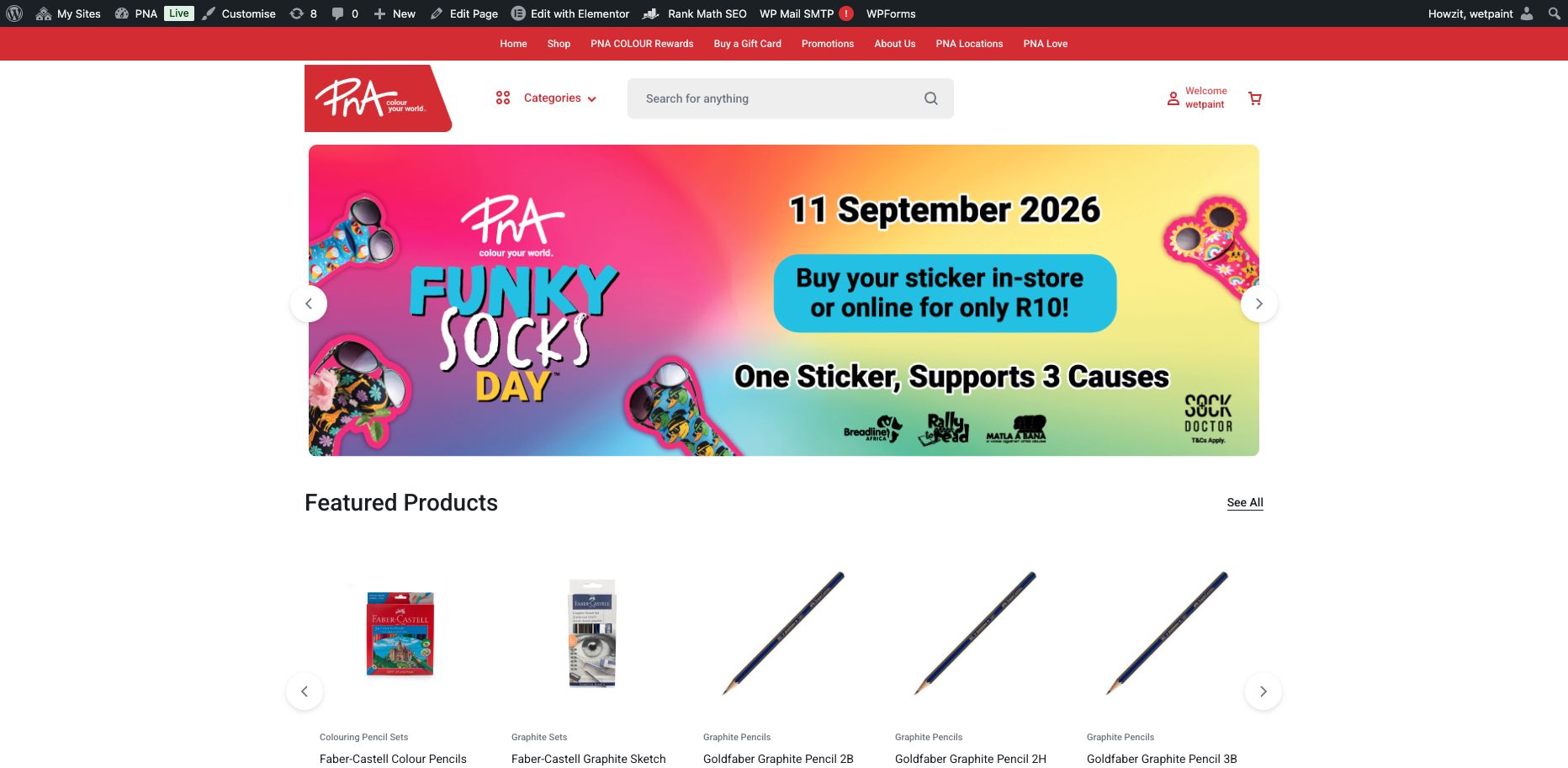
Evidence: strong brand, unclear retail choice
The homepage is recognisably PNA and visually credible, with prominent campaign content. What it does not do is explain the full offer in one sentence or make “Shop Online” and “Find a Store” the two unmistakable starting choices.
| Brand standard | PNA's Creative Guide specifies | What pna.co.za actually uses | Status |
|---|---|---|---|
| Primary font | Roboto — primary font for all PNA communications | Google's Roboto sitewide | Compliant |
| Creative/headline font | Rockwell — campaign/creative executions only | Not used on the transactional site (expected — Rockwell is scoped to print/campaign creative) | N/A here |
| Primary logo & placement | Red "holding shape" logo, top/bottom-left, strapline kept with it | Correct logo, top-left, strapline intact on desktop and mobile | Compliant |
| Corporate colour palette | 11 approved Pantone colours (red, charcoal, grey, greens/blues/cream primary; peach, yellow, teal, olive, purple secondary) | Main site stays within this system | Compliant |
What is not working and should change
| Issue | What is not working | What should change | Severity |
|---|---|---|---|
| Value proposition isn't stated in one clear line | The complete PNA offer is not summarised anywhere as one clear statement — visitors have to infer it from the navigation and category imagery. | Add an above-the-fold statement, e.g. "Shop stationery, school supplies, books, office essentials and art materials online — or find your nearest PNA store." | High |
| Shopping online vs. finding a store isn't a clear choice | Both journeys exist, but neither is presented as one of two dominant, persistent actions. "PNA Locations" is less direct than "Find a Store," and neither choice tells visitors that a store must be selected before they can buy. | Use persistent "Shop Online" and "Find a Store" actions in the desktop header and mobile navigation; rename "PNA Locations" to "Find a Store". | High |
| "Buy a Gift Card" leads to an off-palette microsite | The link leaves pna.co.za for colouryour.world, a separate domain with its own nav and cookie-consent popup, using a bright pink/magenta colour scheme — pink appears nowhere in PNA's 11-colour approved palette — and the fallback script-only logo instead of the primary holding-shape mark. |
Integrate gift-card purchase into the main PNA platform where practical. If the external service must remain, make the hand-off seamless through PNA-approved branding, consistent navigation and account messaging, a clear return route to pna.co.za and matching support information. | Medium |
| Mobile hero banners are cropped at the edges | Banner images are art-directed for a wide desktop ratio; on mobile, text and logo elements get clipped (seen on "100+10 Free" and "Funky Socks Day"). | Supply a separate mobile-cropped asset, or use responsive art-direction via <picture>. |
Low |
| Inconsistent inline emphasis in body copy | One phrase ("at exceptional value") is styled bold red mid-paragraph on About Us, with no comparable emphasis anywhere else on the site. | Remove the one-off styling or apply a consistent, intentional emphasis pattern sitewide. | Low |
- The visual system reads as modern, credible and recognisably PNA, but stale campaign dates, the broken Shop my School destination and the missing route to purchase weaken that first impression.
- Priority promotions are visible in homepage banners and on the Promotions page, but expired campaign material remains live alongside current offers.
- Campaign integration is inconsistent: the Promotions page mixes current and expired material, while "Buy a Gift Card" drops visitors into an off-brand microsite — campaigns aren't yet integrated as one coherent, on-brand thread.
Mobile Experience
Tested at a 390×844 viewport across the homepage and product journey, covering menu, links and buttons, readability, browsing, search, imagery, purchase controls and responsive behaviour.
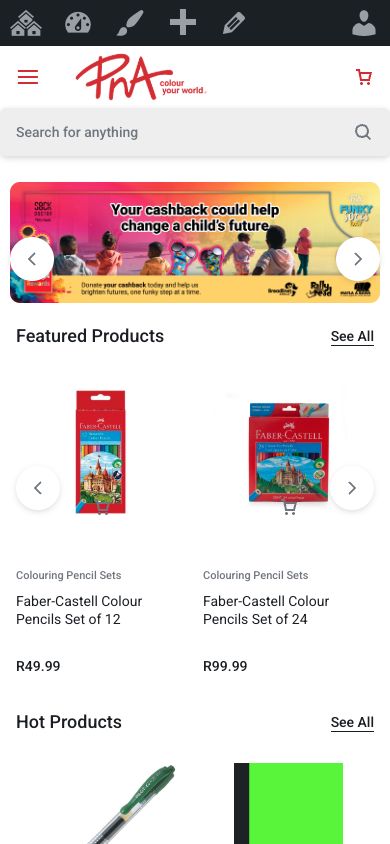
Evidence: responsive layout, but weak shopping controls
The page adapts cleanly to a narrow screen, yet the product-card action is only about 20×21 px and uses a cart symbol for a “Read more” link. The mobile experience is not failing because of the layout alone; the shared shopping interaction is the problem.
| Issue | What is not working | What should change | Severity |
|---|---|---|---|
| Grid "quick add" icon is roughly half the recommended tap size | The cart-shaped control is positioned over the product image and measured about 20×21 px on a 390-pixel viewport. It opens the product page as "Read more" instead of adding the item, so its size, position, icon and accessible name communicate four different things. | Use a clearly labelled "View product" control or a genuine Add to Cart after store selection. Give the interactive area at least 44×44 px and keep the visible icon, text and screen-reader name consistent. | High |
| Store-first purchase gating affects mobile identically | Products opened from the mobile homepage show price and "Available in stock" but no quantity or Add to Cart until a specific store has been selected. The requirement is not explained. | Add an unavoidable store-choice step before transactional browsing, remember the choice and expose a visible "change store" control. Then show consistent quantity and Add to Cart controls. | Critical |
| Hero banners crop on mobile | Desktop-format campaign artwork is scaled into a narrow frame, reducing legibility and cropping important promotional content. | Supply a mobile-cropped banner asset. | Low |
No other mobile-only layout breakage (overlapping elements, horizontal scroll, unreadable text, broken pop-ups) was found across the pages tested.
On-site Search
Assessed: search accuracy, predictive suggestions, spelling tolerance, product-name and category recognition, zero-result searches, result relevance, filters and sorting, availability information.
| Issue | What is not working | What should change | Severity |
|---|---|---|---|
| Search results don't prioritise the closest match | Searching "pen" returns 228 results with "PNA Pencils HB Pack of 24" first, ahead of any actual pens — broad substring matching (pen → pencil) overwhelms relevance. | Tune relevance/weighting so exact word-boundary and title matches outrank partial/description matches, or add a dedicated search plugin. | Medium |
| Zero-result searches are a dead end | A no-match search shows only "No products were found matching your selection." — no spelling suggestions, no "did you mean," no popular products, no related categories. | Add a zero-results fallback: suggested categories, best-sellers, or a "did you mean" prompt. | Medium |
| No predictive suggestions while typing | Typing into the search box (tested with "penc") produces no autocomplete/autosuggest dropdown at all — no product-name suggestions, no category shortcuts. A customer has to type a full query and submit blind every time. | Add predictive search as part of one consistent results-card system. Suggestions and result cards should show image, product name, price, a short key specification and an explicit In Stock / Out of Stock state, with category shortcuts where useful. | Medium |
| Zero spelling tolerance — common misspellings return nothing | Searching the one-letter misspelling "pensil" (for "pencil," one of PNA's core product lines) returns "No products were found matching your selection" — the same dead end as the zero-result finding above, but for a query a real customer is likely to type. | Add fuzzy/typo-tolerant matching (e.g. a Levenshtein-distance or "did you mean" layer) so near-misses on common product names still surface results. | Medium |
Usage evidence: GA4 records 3,999 view_search_results events from 1,540 users on 18 August, confirming that on-site search is a meaningful customer journey. The current report does not expose common query terms or zero-result status, so the requested “most common searches” assessment remains pending until those dimensions are added. Filtering and sorting on search results use the same underlying widget reviewed under Product Discovery; redesign search, filters and result cards as one experience with consistent price, key specification and stock status.
Accessibility and Usability
Checked: colour contrast, font sizes, keyboard navigation, image descriptions, form labels, error messages, button clarity, consistency of icons and terminology, ease of use across digital-confidence levels.
| Issue | What is not working | What should change | Severity |
|---|---|---|---|
| 16% of homepage images are missing alt text | All rotating promotional banners (24 of 148 homepage images) have no alt attribute — screen readers get no description, and search engines can't index the promotional content. | Add descriptive alt text to every promotional banner as part of the upload process. | Medium |
| Interactive elements are undersized for touch and precision input | A wider homepage sweep found 316 of 449 checked interactive elements below 40 px in at least one dimension. The cart-shaped product control measured about 20×21 px and is positioned over the product image. | Increase interactive hit areas to at least 44×44 px in shared header, carousel and product-card components, starting with the product action. | Medium |
| No visible keyboard-focus indicator anywhere tested | Pressing Tab repeatedly through the header produces no visible outline or highlight. A keyboard or low-vision user therefore cannot see which control will activate next. This fails the Web Content Accessibility Guidelines requirement for visible focus. | Add a visible focus style (outline or equivalent) sitewide — almost certainly a global outline: none or similar reset with nothing put back in its place. A CSS-only fix. |
High |
| Minor form accessibility flags | Chrome's own checks flag one homepage field without an id/name attribute and two without autocomplete (likely newsletter/search forms). | Add proper name/id/autocomplete attributes to the flagged fields. | Low |
- Colour contrast, font sizes and button-label clarity did not surface obvious issues on the pages sampled.
- Icon/terminology consistency has one confirmed problem (the grid "quick add" icon behaves as a "Read more" link) — otherwise icons and terminology were used consistently.
- Checkout and account form validation, error recovery and assistive-technology behaviour were not fully tested because no controlled transaction was submitted. A WCAG 2.2 AA audit across all shared templates remains an implementation acceptance criterion.
Conversion and Performance Audit
What we assessed: the full recorded funnel, traffic source, browser/device signals, internal search, new/returning audiences and whether the available analytics can support conversion decisions. Current figures below use 18 August 2026, the first full day of the newly configured reporting view. They are a diagnostic snapshot, not a commercial baseline.
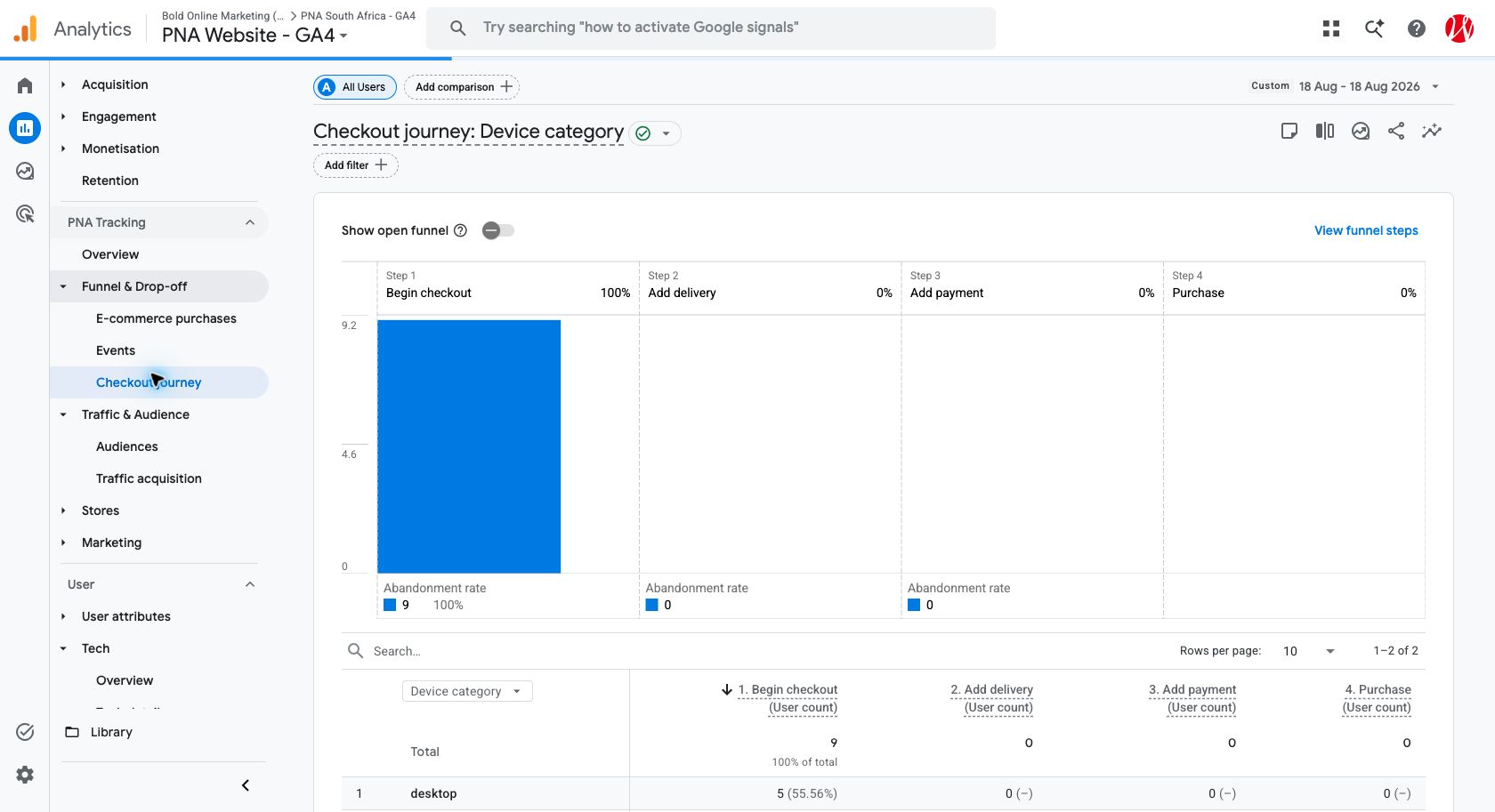
Evidence: customers reach checkout, then recorded progression stops
GA4 records 9 checkout users—5 desktop and 4 mobile—but zero users adding delivery, adding payment or purchasing. This is a measurement and journey warning, not proof that every one of those users genuinely abandoned; tag coverage and a controlled order must be validated.
Why it matters: PNA cannot yet separate customer abandonment from missing tracking.
| Funnel stage | Recorded users | Conversion to next stage | Recorded drop-off |
|---|---|---|---|
| Website users | 5,297 users | 10.5% reached a recorded product view | 89.5% did not reach a recorded product view |
Product viewed (view_item) | 557 users / 916 events | 2.9% added to cart | 97.1% |
Added to cart (add_to_cart) | 16 users / 192 events | 56.3% began checkout | 43.8% |
Checkout started (begin_checkout) | 9 users / 20 events* | 0% added delivery | 100% |
| Delivery added | 0 recorded | — | — |
| Payment initiated | 0 recorded | — | — |
| Purchase completed | 0 recorded | — | — |
- *Measurement caveat: Checkout Journey confirms the 9 checkout users and splits them between desktop (5) and mobile (4). The unusually high 192 add-to-cart events from only 16 users still requires de-duplication testing, and later checkout events remain absent. Rates are therefore provisional.
- Historical audience context: GA4's 1 May–31 July report shows 491k new users and 66k returning users, with 0 recorded purchasers and R0.00 recorded purchase revenue. These values are retained as the available audience baseline, not proof that no sales occurred.
- Internal search: 3,999
view_search_resultsevents from 1,540 users confirm meaningful search usage, but the report does not expose the common terms or zero-result rate required for search-success analysis. - Technical signal: GA4 records 5,012
js_errorevents from 1,931 users on the same day. The event's parameters and source pages need validation before treating every event as a unique site fault.
Traffic source snapshot
| Channel | Sessions | Share | Recorded revenue |
|---|---|---|---|
| Organic Search | 2,558 | 42.48% | R0.00 |
| Direct | 2,104 | 34.94% | R0.00 |
| Referral | 733 | 12.17% | R0.00 |
| Cross-network | 382 | 6.34% | R0.00 |
| Paid + organic social, paid search, AI assistant and unassigned | 135 shown across the remaining rows | 2.25% shown | R0.00 |
GA4 Traffic acquisition, 18 August 2026. Channel conversion cannot yet be calculated because no completed purchase is recorded.
Technical Performance Audit
What we assessed: a Lighthouse lab test of the live homepage on mobile and desktop, plus representative-page checks for loading, secure connection and browser errors. This is not a full catalogue crawl or a substitute for real-user field data, hosting logs, backup evidence or integration monitoring.
Mobile · 390 px profile
Largest Contentful Paint 25.2s · First Contentful Paint 4.5s · Speed Index 11.1s
Desktop
Largest Contentful Paint 2.0s · First Contentful Paint 1.0s · Speed Index 3.7s
Lighthouse 13.4.1, single lab run on 18 August 2026. Google's good Largest Contentful Paint threshold is 2.5s or less. Results vary by run and should be repeated across homepage, category, product, cart and checkout templates.
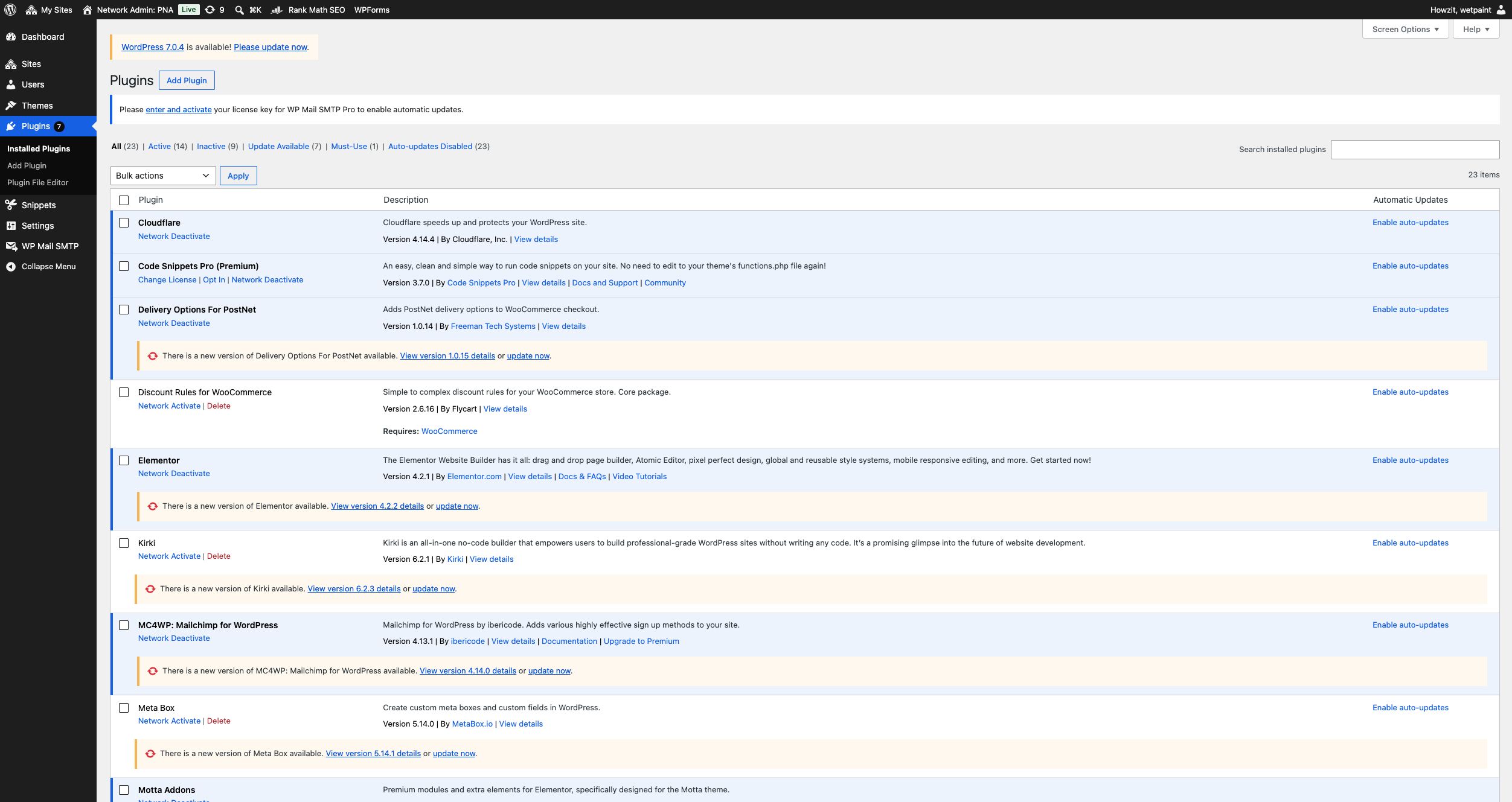
Evidence: platform maintenance is an operational risk
WordPress reports core and plugin updates, while Motta reports inactive required dependencies. Site Health separately records two Critical issues and four recommended improvements, including a failed scheduled event and no persistent object cache.
Interpretation: this supports staged maintenance, monitoring and regression testing—not an automatic platform replacement.
| Issue | What is not working | What should change | Severity |
|---|---|---|---|
| Mobile main content appears far too late | Mobile Largest Contentful Paint—the time until the largest visible image or text block appears—was 25.2s, more than ten times Google's good threshold of 2.5s. Desktop reached 2.0s, showing a material mobile-specific gap. The mobile Performance score was 54. | Optimise and preload the mobile hero asset, serve correctly sized modern images, shorten the request chain, delay non-critical scripts and validate hosting response and caching. Repeat tests on cold and warm loads, then confirm with real-user field data. | High |
| Reliability and maintenance vary across the 157-site network | The network grew from 154 sites on 14 August to 157 on 18 August, confirming active operational change. Later Bryanston evidence showed broken templates and repeated HTTP 503 resource failures, although the same storefront loaded correctly on 18 August, indicating an intermittent rather than continuous fault. On 19 August, WordPress Site Health reported two Critical issues (core and plugin updates) plus four recommended improvements: no default theme, missing recommended server modules, a failed scheduled event and no persistent object cache. Motta also reports inactive Kirki and Meta Box dependencies. These are risk indicators, not proof of one root cause. | Introduce a controlled Multisite operating process: representative-store monitoring and regression tests, central 5xx/asset alerting, a site register with creation/archive/indexing ownership, and staged updates with backups, compatibility checks and rollback. Validate Motta dependencies and test the PostNet update in staging before redevelopment. | High View screenshots → |
| Site Health and scheduled maintenance need formal ownership | WordPress reports a current core update, plugins waiting to be updated, a failed scheduled event and missing performance modules/cache. These affect security, background jobs and repeat-page performance; their network-wide impact has not yet been measured. | Assign an owner and maintenance window, validate backups and rollback first, test core/plugin updates in staging, investigate the failed scheduled action, confirm the missing server modules with hosting, and implement an appropriate persistent object cache after compatibility testing. | High |
- Every page visited loaded over valid HTTPS with no browser security warnings. The initial representative sample showed no site-generated JavaScript errors; later Bryanston evidence captured HTTP 503 resource failures, while the 18 August recheck loaded correctly. Treat reliability as intermittent and verify it with hosting logs and monitoring.
- Page-level observations are not an exhaustive sitewide crawl. A representative sample across live, archived and newly created store subsites, shared templates and fulfilment configurations should form part of every implementation release.
- Browser compatibility status: functional cross-browser testing remains pending. GA4 shows that Chrome, Safari, Android Webview, Samsung Internet and Edge account for 97.4% of active users in the 18 August snapshot; these five environments should form the minimum release test matrix, with Firefox and in-app Safari as secondary coverage.
- Hosting reliability, CMS stability, platform scalability, third-party integration health, product-feed reliability, inventory sync and backup/recovery all require infrastructure/CMS access not available to this audit — flag for direct discussion with PNA's IT department during handover.
Analytics and Tracking Audit
What we assessed: GA4 reports and the live GTM workspace were reviewed read-only on 19 August. No tags, triggers, variables, settings or site content were changed. Event presence in a report confirms receipt, not correct implementation; parameters, de-duplication and reconciliation still require a controlled journey.
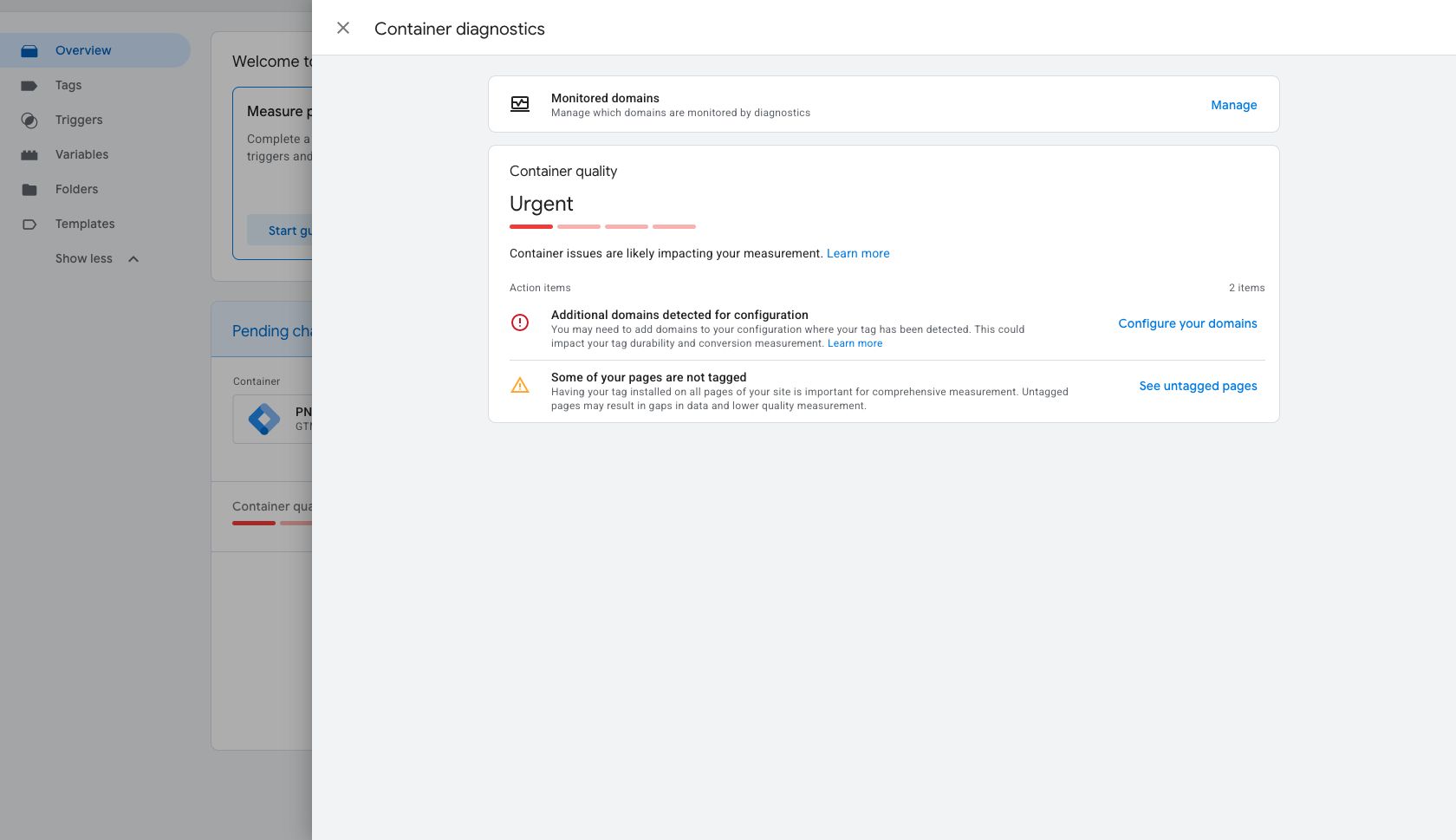
Evidence: GTM identifies two coverage failures
Container quality is marked “Urgent.” Google reports additional detected domains that need configuration and pages where the tag is missing.
Business impact: customer journeys can be fragmented between domains and pages, making conversion and revenue reporting incomplete.
| Issue | What is not working | What should change | Severity |
|---|---|---|---|
| Heavy, overlapping third-party tracking scripts on every page | A single homepage load fires Google Tag Manager, Google Analytics, Google Ads/Doubleclick remarketing, two separate Facebook Pixel IDs, two separate TikTok Pixel IDs, Hotjar, Microsoft Clarity and a custom analytics endpoint — 15+ third-party requests before the user does anything. | Consolidate/retire duplicate pixels, defer non-critical trackers until after first paint, and review whether a consent banner is needed (the gift-card microsite shows one; pna.co.za doesn't). | Medium |
| GTM reports urgent tag-coverage gaps | Container GTM-K4CBKSF labels quality “Urgent” and lists two action items: additional domains were detected but are not configured, and some pages are not tagged. Cross-domain and page coverage gaps can fragment journeys and lower conversion-measurement quality. | Inventory every domain and subdomain used by the main site, store sites, gift cards, payment and fulfilment journeys; configure only the legitimate cross-domain set; tag every priority template; then clear diagnostics in a controlled release. | High |
| Recorded e-commerce events stop before delivery and payment | On 18 August, GA4 records 916 view_item, 192 add_to_cart, 35 view_cart and 20 begin_checkout events, but no recorded add-delivery, add-payment or purchase events and R0.00 revenue. |
Implement and validate the missing checkout-stage events with item, value, currency, store, fulfilment and transaction parameters. Confirm each event fires once on desktop and mobile through a controlled order. | High |
| Add-to-cart volume requires de-duplication validation | GA4 records 192 add_to_cart events from only 16 users, an average of 12 events per recorded user. That may reflect genuine repeated cart actions, duplicate firing or both; it cannot be assumed either way without a controlled trace. |
Use GTM Preview/Tag Assistant to trace one journey, remove duplicate firing if present, confirm User-ID/cross-domain behaviour, inspect event parameters and compare DebugView with the resulting WooCommerce order. | High |
Required measurement coverage
| Required signal | Status on 18 August | Recorded evidence / action |
|---|---|---|
| Product views | Recorded | view_item: 916 events / 557 users; validate product parameters. |
| Category views | Not verified | Define and validate a category-list/view event with category and store context. |
| Internal searches | Recorded | view_search_results: 3,999 events / 1,540 users; expose search terms and zero-result status. |
| Filter usage | Not verified | Add filter name/value, result count and category context. |
| Add to cart | Recorded; quality concern | add_to_cart: 192 events / 16 users; check duplicate firing and item data. |
| Remove from cart | Not recorded in the event list | Implement remove_from_cart and validate quantity/value. |
| Checkout stages | Begin only | begin_checkout exists; delivery and payment stages are absent. |
| Delivery / collection choice | Not recorded | Capture method, store/PostNet choice, fee and postcode/region at an appropriate non-personal level. |
| Payment initiation | Not recorded | Implement add_payment_info without transmitting card or personal details. |
| Purchase, revenue and transaction ID | 0 recorded | Complete a controlled order; validate one de-duplicated purchase and reconcile its value. |
| Promotional-code usage | Not verified | Capture coupon name at cart/checkout and final purchase. |
| Store-locator actions | Not verified | Track locator open, search, store select, directions and contact actions with store ID. |
| Calls, emails and form submissions | Forms only | form_start and form_submit exist; verify form identity, success state, phone clicks and email clicks. |
Reconciliation rule: reported online sales must agree across GA4, WooCommerce, the payment gateway and finance. Differences need an owner, tolerance and documented adjustment process before the dashboard is used for decisions.
SEO and E-commerce Discoverability
Focused on: product/category-page indexation, product titles and descriptions, duplicate content, structured product data, pricing/availability signals, internal linking, out-of-stock handling, campaign landing pages, image optimisation, Google Shopping feed readiness.
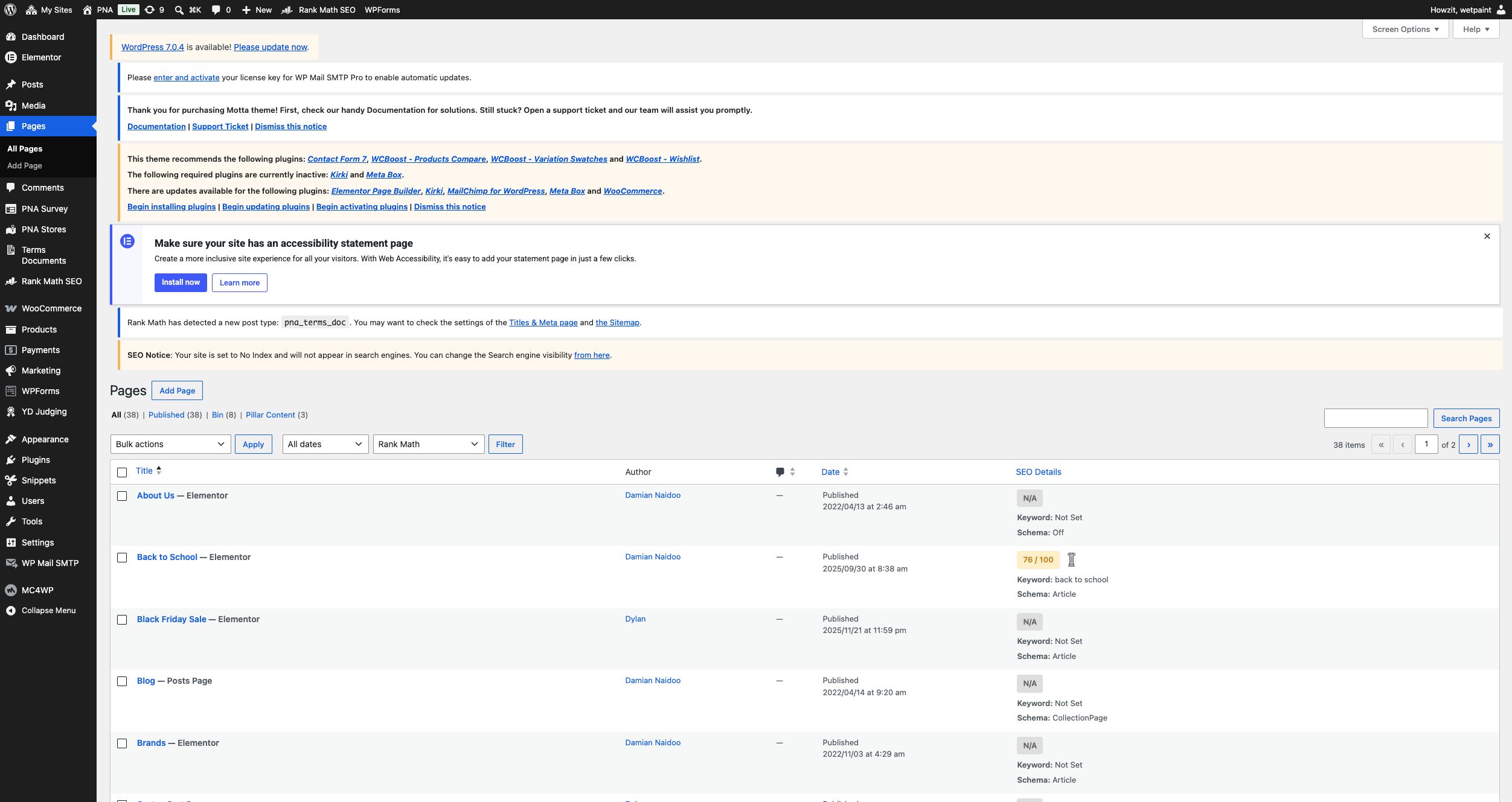
Evidence: SEO implementation is incomplete page by page
The WordPress page inventory shows published pages with missing Rank Math scores or focus keywords and inconsistent schema settings. This confirms a governance problem across the content inventory, not a single missing homepage tag.
| Issue | What is not working | What should change | Severity |
|---|---|---|---|
| Product pages carry no Product structured data | The only schema.org data found anywhere is a BreadcrumbList. No Product/Offer schema exists — Google has nothing to build price, availability or rating rich results from, and this is also a prerequisite for a healthy Google Shopping feed. | Add Product structured data (price, availability, SKU, reviews) to the product template — most WooCommerce SEO plugins generate this automatically once configured. | Medium |
| Page-by-page SEO optimisation is incomplete | The homepage has no meta description or Open Graph tags, and the WordPress Pages list shows many published pages with a Rank Math score of N/A, no focus keyword and inconsistent schema settings (including Schema Off or generic Article schema). The issue is broader than one missing homepage tag. | Run a structured page-level SEO programme covering titles, meta descriptions, focus keywords, heading structure, canonical settings, schema, Open Graph/social metadata, image optimisation and internal linking. Prioritise the homepage, store selection, top categories, campaigns and high-value products. | High View screenshot → |
| Sitemap and public URL inventory need cleanup | The XML sitemap exists but is not referenced in robots.txt. Rank Math also has both Footer Builder Template and Motta Template Builder set to "Include in Sitemap," while old pages, redundant links and expired campaign URLs remain publicly accessible. | Choose one canonical sitemap, reference it in robots.txt, exclude internal builder/template types unless they serve a clear search purpose, and run a URL inventory to remove, archive or redirect obsolete and duplicate content. | Medium |
The WordPress "No Index" warning links to the Boskruin store subsite, where "Discourage search engines" is checked and the toolbar labels the store "coming soon." The main pna.co.za setting is unchecked. Add indexing-state QA to the 157-site governance checklist so live stores are indexable and unfinished or archived stores remain excluded.
Observation, not scored — AI-crawler accessrobots.txt explicitly disallows a list of AI crawlers (GPTBot, ClaudeBot, Google-Extended, Applebot-Extended, and others) with an "ai-train=no" content signal — likely a deliberate rights-reservation choice. Worth a conscious decision either way, given the growing share of shoppers discovering products via AI-powered search and shopping assistants.
Duplicate product content and out-of-stock handling were not found to be issues in the sampled pages, but a full content and URL inventory was not completed. Product titles/descriptions quality is covered under Content and Merchandising below.
Content and Merchandising Audit
Checked: promotional banners, seasonal collections, product hierarchy, bestsellers/new arrivals, cross-selling/upselling, campaign landing pages, online-exclusive offers, bundles, product recommendations, catalogue integration, content freshness, expired promotions.
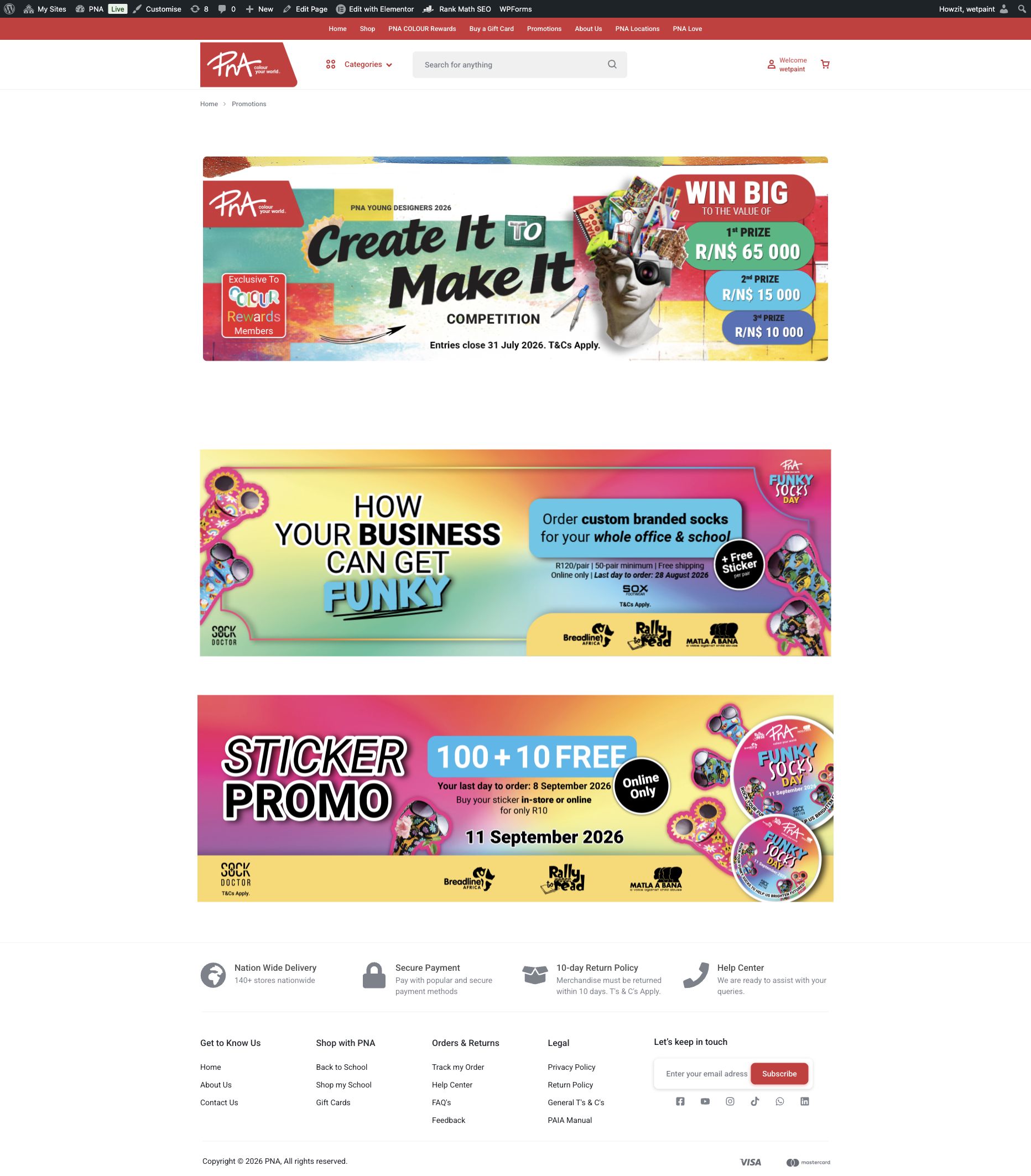
Evidence: expired and current promotions appear together
On 18 August, the Promotions page still presented a Young Designers campaign with a 31 July closing date beside current Funky Socks offers.
Business impact: customers cannot confidently tell which offers are active, and campaign pages become an unreliable retail channel.
| Issue | What is not working | What should change | Severity |
|---|---|---|---|
| Promotions page mixes current and expired campaign content | The Promotions page now contains three campaign banners, but the first still advertises the PNA Young Designers competition with an entry deadline of 31 July 2026. It remains presented as a live promotion on 18 August 2026 alongside current Funky Socks offers. | Remove or archive expired campaigns automatically, add visible offer dates and keep only current promotions in the primary journey. | Medium |
| Product descriptions read as unedited, comma-spliced copy | Descriptions across the sampled catalogue run multiple claims together with commas, lack a consistent specification structure and read as unreviewed bulk copy. | Use a reusable product-content template with a short benefit summary, scannable features, specifications, delivery information and a human editorial check. | Medium |
| No cart cross-selling and no transactional bundles | The cart does not recommend complementary items. The School Bundles promotion leads to static campaign content rather than a selectable bundle with one-click add-to-cart and bundle pricing. | Add tightly relevant cart recommendations and build true bundle products for school lists and seasonal sets, with stock and pricing validated per store. | Medium |
| Newsletter field typo, repeated sitewide | The footer newsletter placeholder reads "Enter your email adress" (missing a "d") on every page. | One-line fix in the footer template — worth prioritising given how visible and repeated it is. | Low |
| Expired in-store promotion still live across four site entry points | The "Mid-Year Back to School Savings" campaign (1 – 20 July 2026) and a "20% off RGS Puzzles" promotion (26 June – 20 July 2026) were still being actively surfaced on 7–8 August 2026, 2 to 3 weeks after they ended. On 18 August, the Promotions page itself also retained a PNA Young Designers banner stating "Entries close 31 July 2026" alongside current Funky Socks offers. The specific placements have changed, but the underlying content-expiry problem remains. | Set an editorial process (even a simple calendar reminder tied to each campaign's end date) to swap or remove expired promotional content — for a retail stationery calendar this recurs every school term, so it's worth automating rather than relying on someone remembering. | Medium |
- A Hot Products carousel, seasonal collections and a Similar Products module are present.
- Run a complete content inventory covering old pages, duplicate URLs, redundant navigation links and expired campaigns; remove, archive or redirect each item and then refresh the sitemap.
- Catalogue integration (whether pna.co.za reflects the same catalogue used in-store/POS) can't be assessed externally and is marked not measured.
Competitor Benchmark
A consistent public-journey comparison against three South African retailers with overlapping stationery and gifting ranges. No competitor purchases were placed. Lighthouse page-speed figures are single mobile lab runs on 18 August 2026 and should be read directionally.
| Area | PNA | Waltons | The Crazy Store | CNA |
|---|---|---|---|---|
| Mobile experience | Clear layout, but purchase controls and store routing fail | Complete shopping controls and 90 accessibility score | Clear catalogue-led mobile experience | Unavailable: server error |
| Navigation | Crowded menu and inconsistent category hierarchy | Six clear departments plus utilities | Products, promotions and store finder are explicit | Unavailable |
| Product search | Weak relevance, no suggestions or spelling tolerance | Prominent product search with popular-query shortcuts | Visible homepage search | Unavailable |
| Product pages | Main pages show stock but no Add to Cart; thin delivery detail | Delivery, local stock, wishlist, specifications, related items and reviews | Useful catalogue details, not a transactional page | Unavailable |
| Checkout simplicity | Store gate, broken PostNet and no standard card payment | Full e-commerce path with clear cart actions | No online checkout | Unavailable |
| Delivery & collection | Free store pickup works; delivery cost/timing appears late | Delivery area, same-day eligibility, tracking and free-delivery threshold are prominent | Store Finder supports the store-led model | Unavailable |
| Promotions | Strong banners, but expired campaign content remains live beside current offers | Current promotions connect directly to shopping | Dedicated leaflets and promotions with priced products | Unavailable |
| Mobile page speed | Lighthouse Performance 54; Largest Contentful Paint 25.2s | Performance 47; Largest Contentful Paint 8.9s | Performance 97; Largest Contentful Paint 1.5s | Not measurable while offline |
| Overall experience | Strong brand and catalogue foundation, but transaction confidence is broken | Strongest direct e-commerce benchmark | Strong browsing and store-led retail, but no online purchase | Availability is the defining failure during testing |
Live public checks: PNA, Waltons, The Crazy Store and CNA, 18 August 2026. Waltons' product-page feature comparison was also captured on 14 August 2026.
Visual Evidence
A curated evidence set covering the live mobile experience, the missing purchase control, Promotions-page content governance, checkout failure, the changing WordPress network, platform maintenance, page-level SEO and recorded analytics. It includes current GA4 checkout-by-device and GTM diagnostics, plus live homepage, search and store-locator proof captured on 19 August.
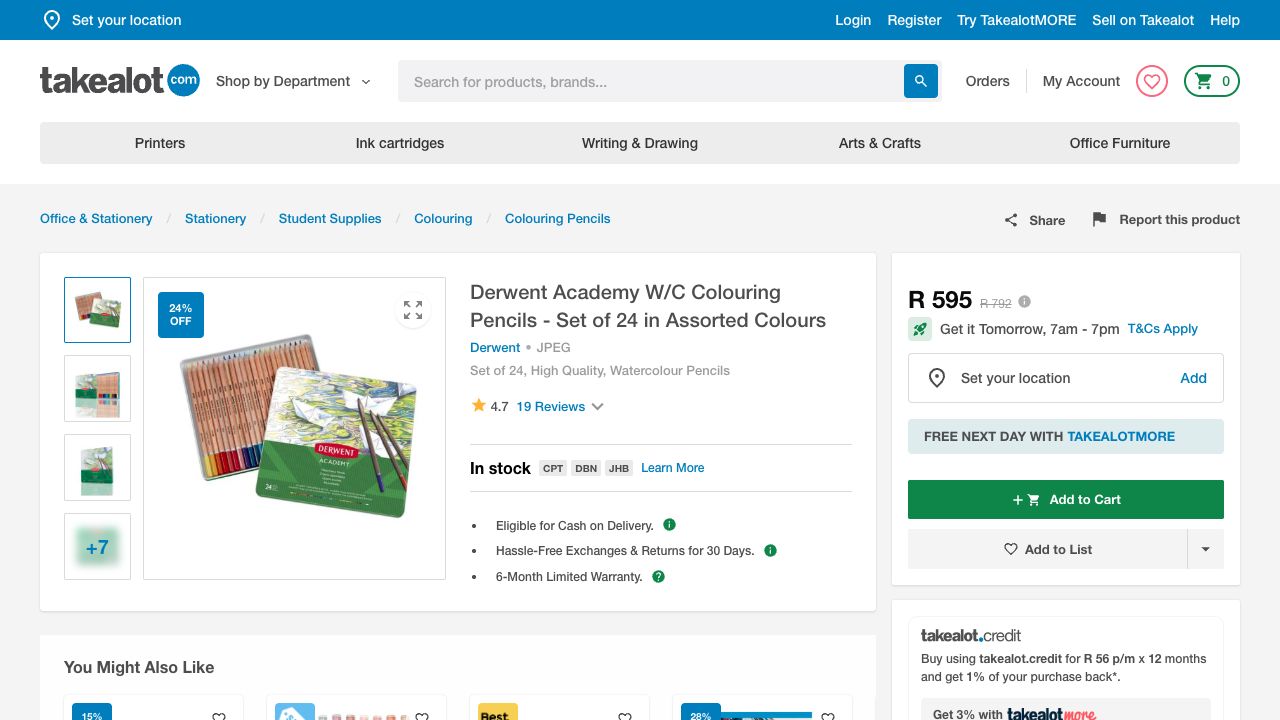
Takealot product-page benchmark. Derwent Academy Watercolour Pencils 24 Pack · live public product page · 20 Aug 2026. Delivery timing, regional stock, reviews, wishlist and recommended products are visible before checkout.
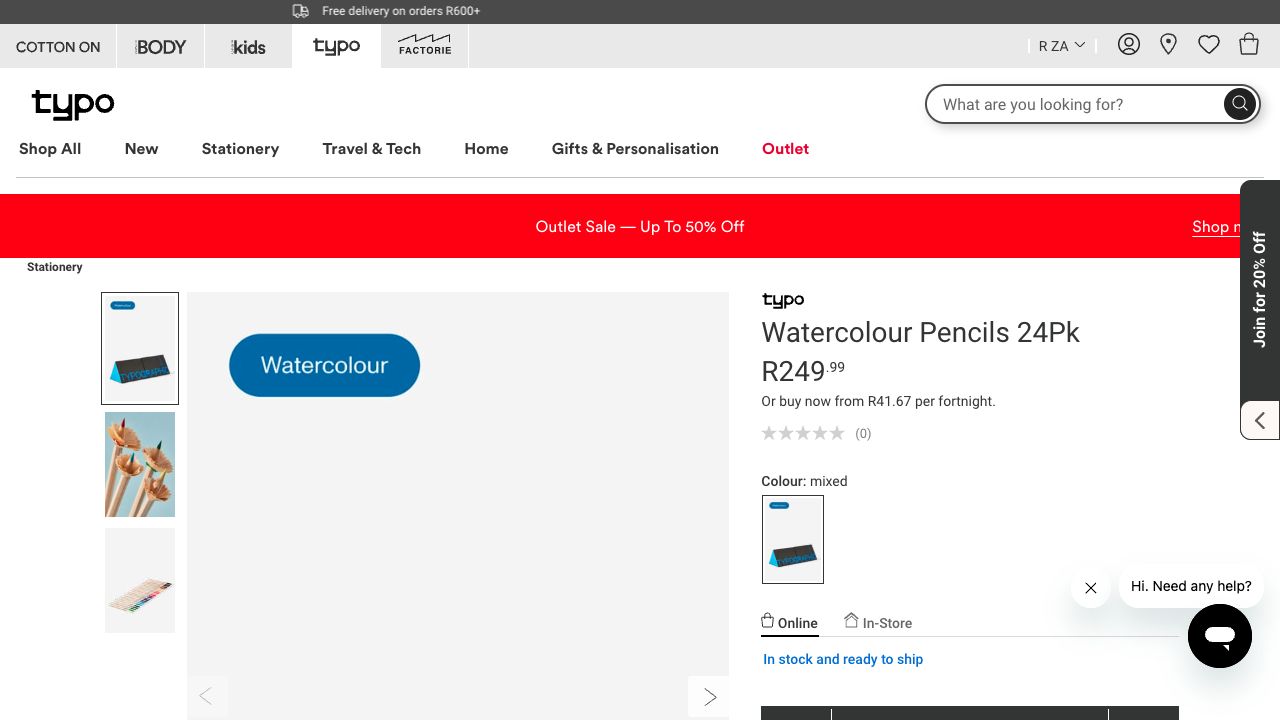
Typo product-page benchmark. Watercolour Pencils 24 Pack · live public product page · 20 Aug 2026. Online and in-store availability, wishlist, delivery, detailed content and related products are visible.
New GA4 checkout journey stops before delivery. GA4 property “PNA Website - GA4” · 18 Aug 2026 · reviewed 19 Aug 2026. Checkout Journey records 9 users split between desktop (5) and mobile (4), followed by zero add-delivery, add-payment and purchase users.
GTM container quality is Urgent. GTM-K4CBKSF · reviewed 19 Aug 2026. Diagnostics report additional domains detected for configuration and pages without the tag, both of which can fragment journey and conversion measurement.
Live mobile homepage. pna.co.za · 390×844 Chrome viewport · 18 Aug 2026. The responsive layout is clean, but the cart-shaped product control is a roughly 20×21 px "Read more" link rather than a purchase action.
Main-site product page still has no purchase control. pna.co.za · authenticated desktop session · 18 Aug 2026. Price and "Available in stock" are shown, but no quantity selector, store-choice instruction or Add to Cart action appears.
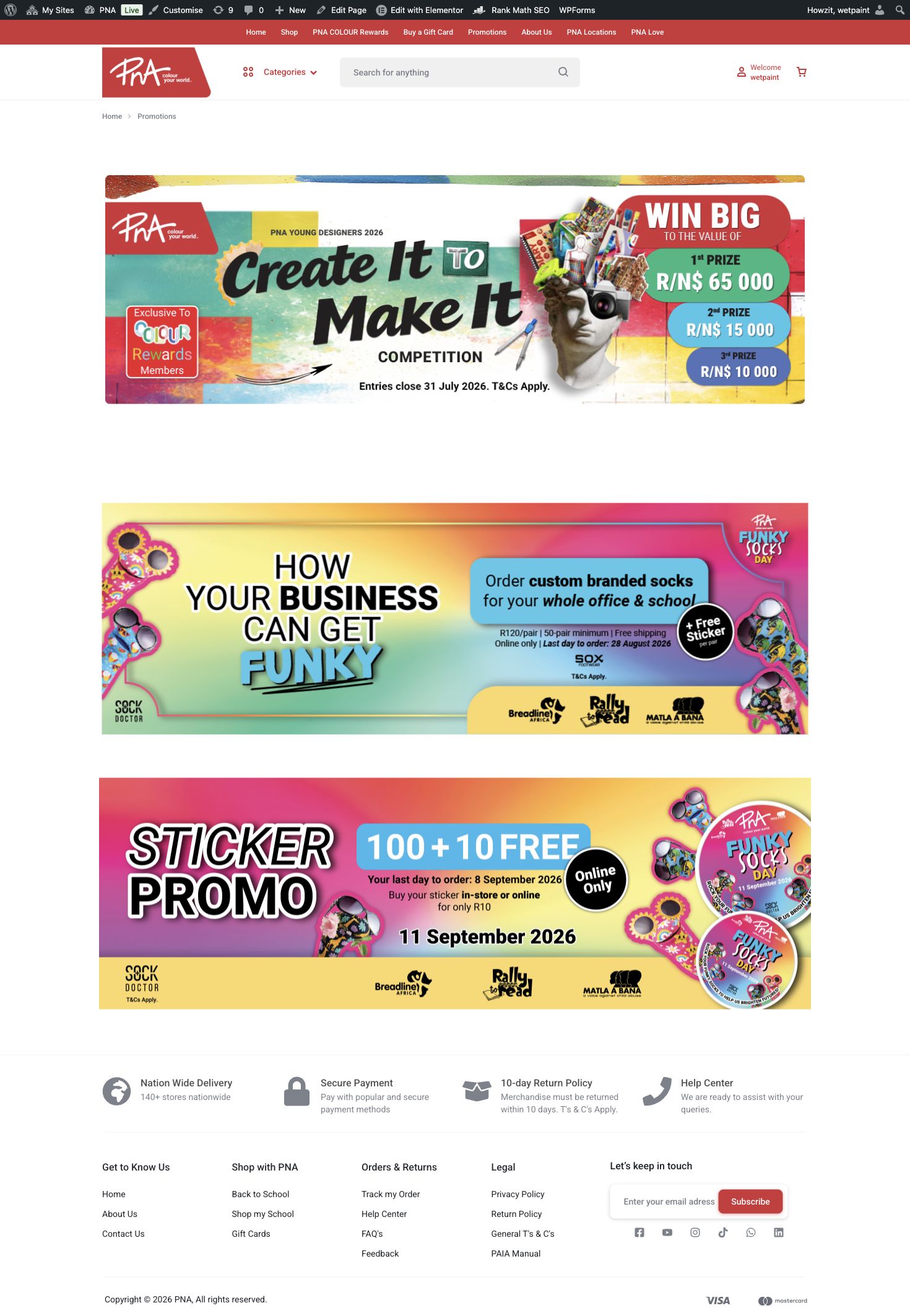
Promotions page retains an expired campaign. pna.co.za/promotions/ · authenticated desktop session · 19 Aug 2026. The leading PNA Young Designers banner states "Entries close 31 July 2026" above current August and September offers.
Contact and copy-quality evidence. pna.co.za/contact-us/ · authenticated desktop session · 19 Aug 2026. The page provides phone, email and chat links but no enquiry form. The footer newsletter placeholder reads "Enter your email adress".
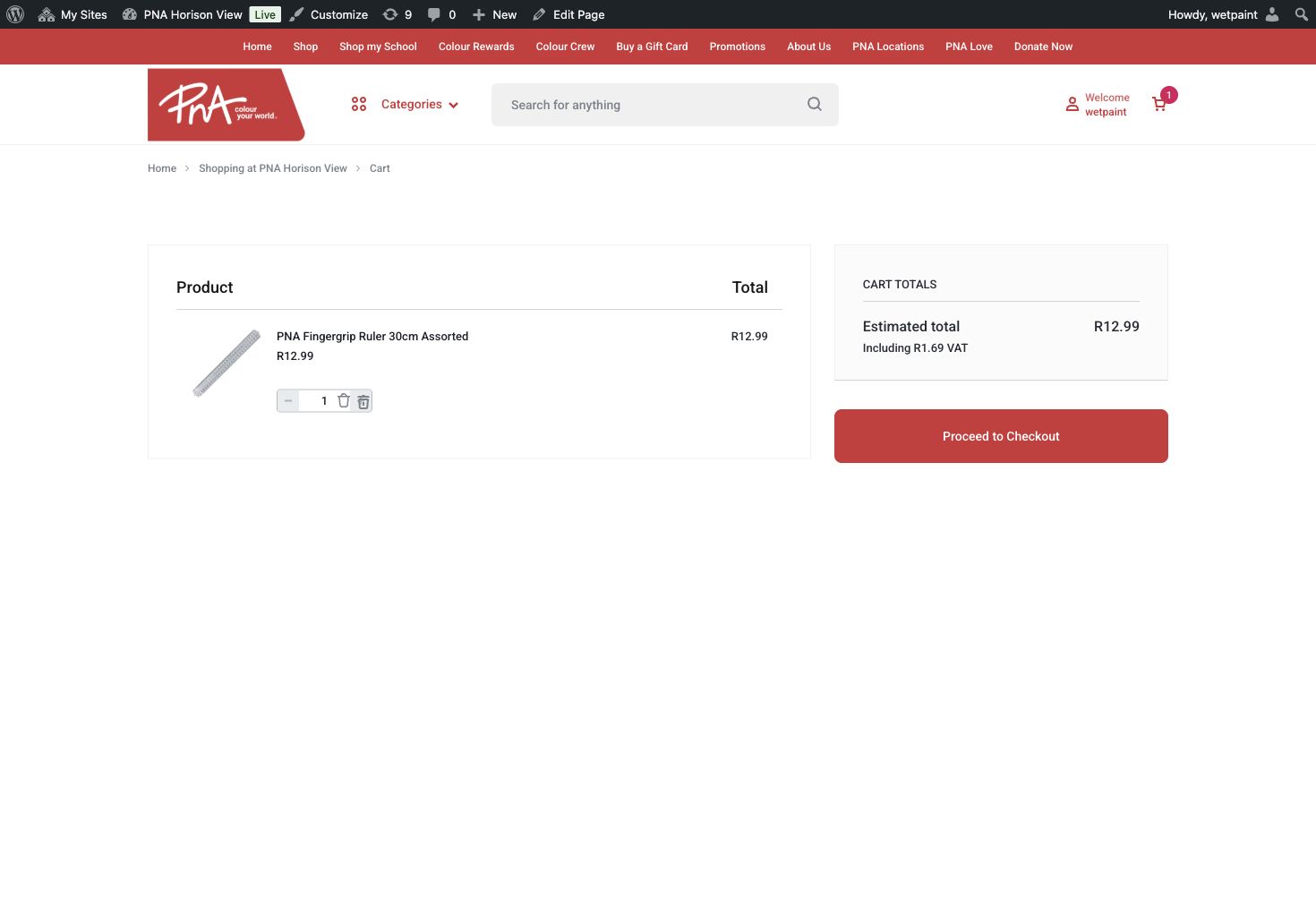
The cart does little to support the sale. PNA Horison View · authenticated desktop session · 19 Aug 2026. The R12.99 test basket has no promotion-code field, delivery estimate or product recommendations.
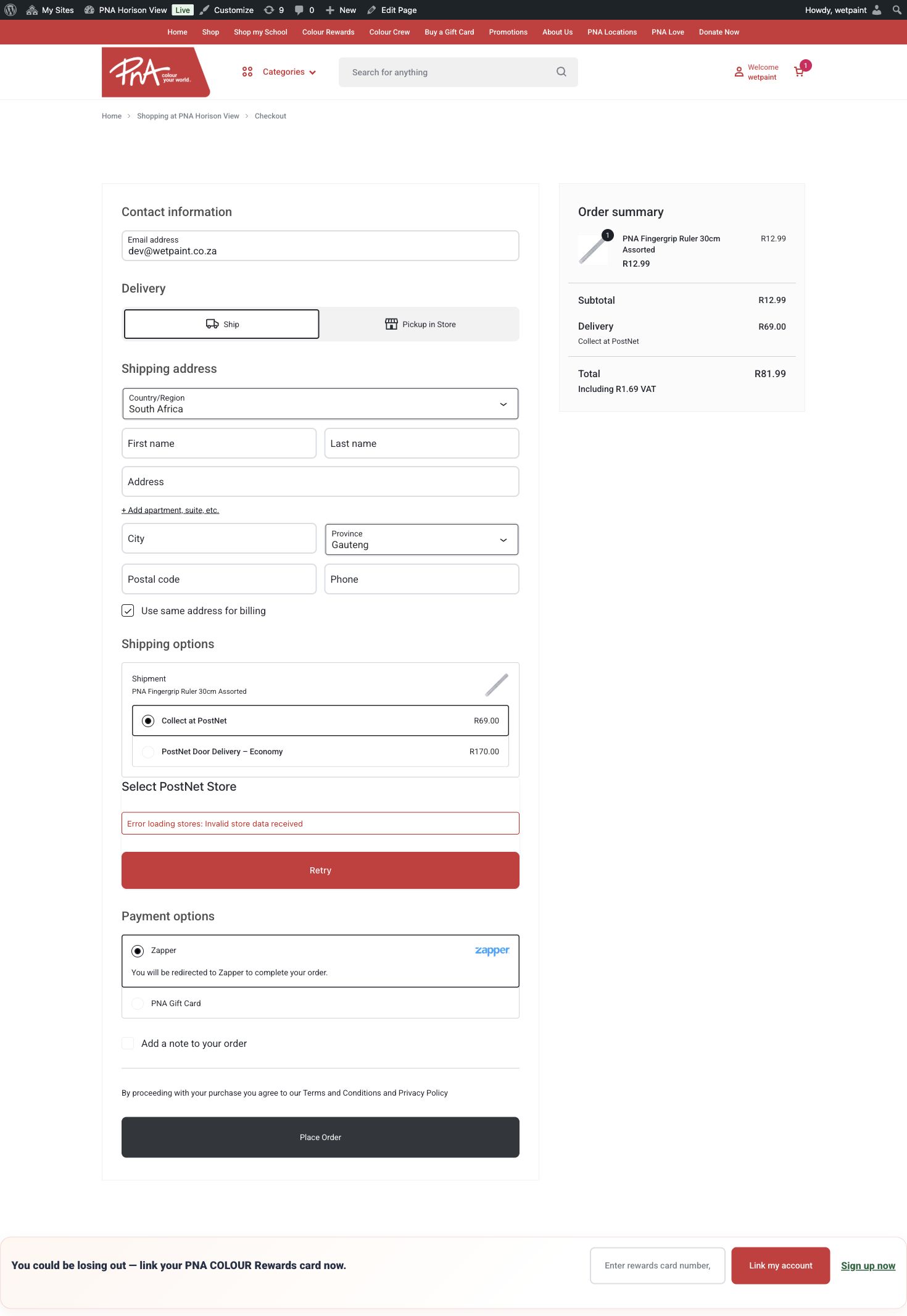
Delivery exceeds the product value. PNA Horison View checkout · authenticated desktop session · 19 Aug 2026. A R12.99 item attracts R69 PostNet collection, taking the order total to R81.99.
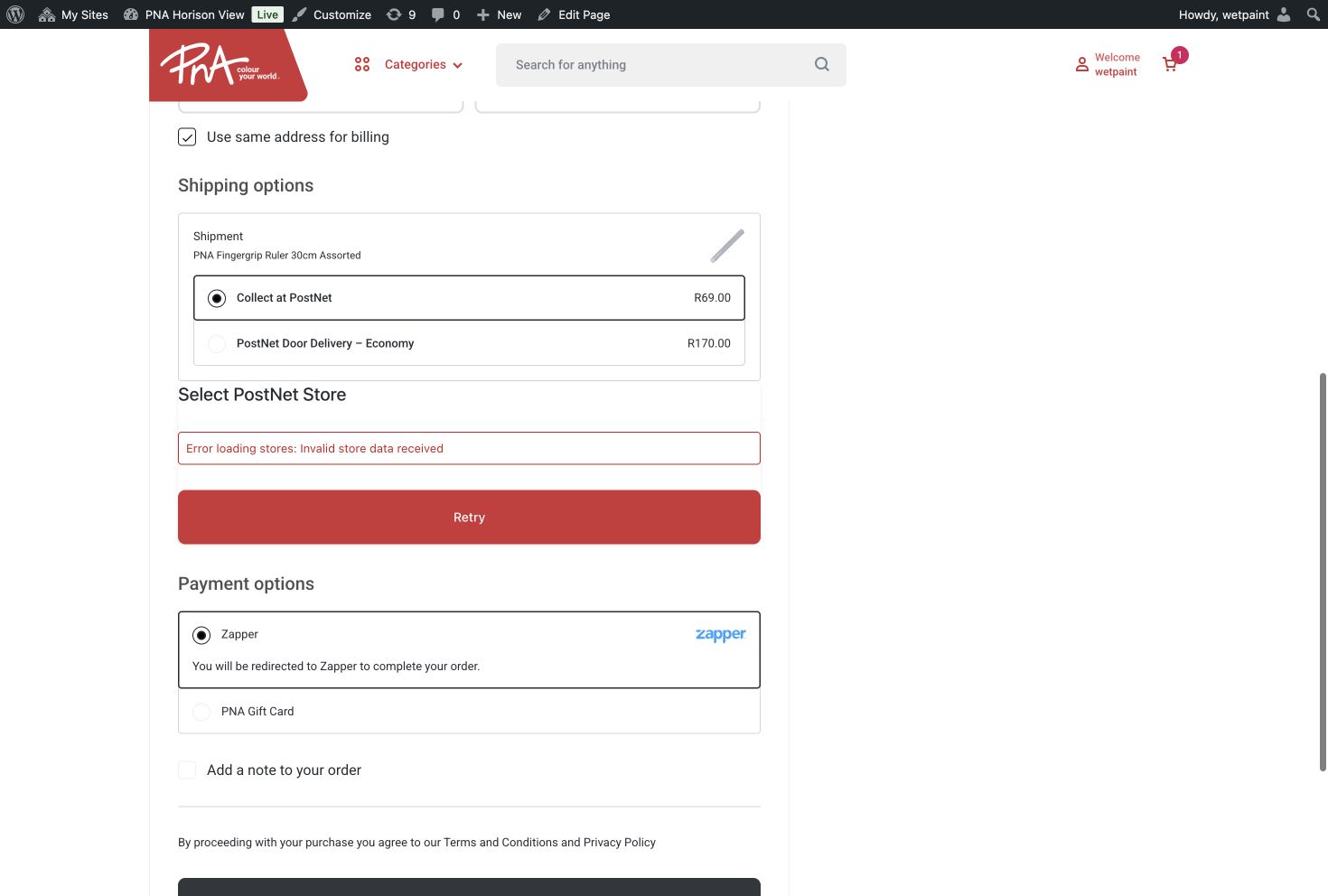
Delivery, PostNet and payment evidence. PNA Horison View checkout · authenticated desktop session · 19 Aug 2026. Options show R69 collection and R170 economy delivery; the PostNet store selector returns "Invalid store data received" and Zapper is the active standard payment option.
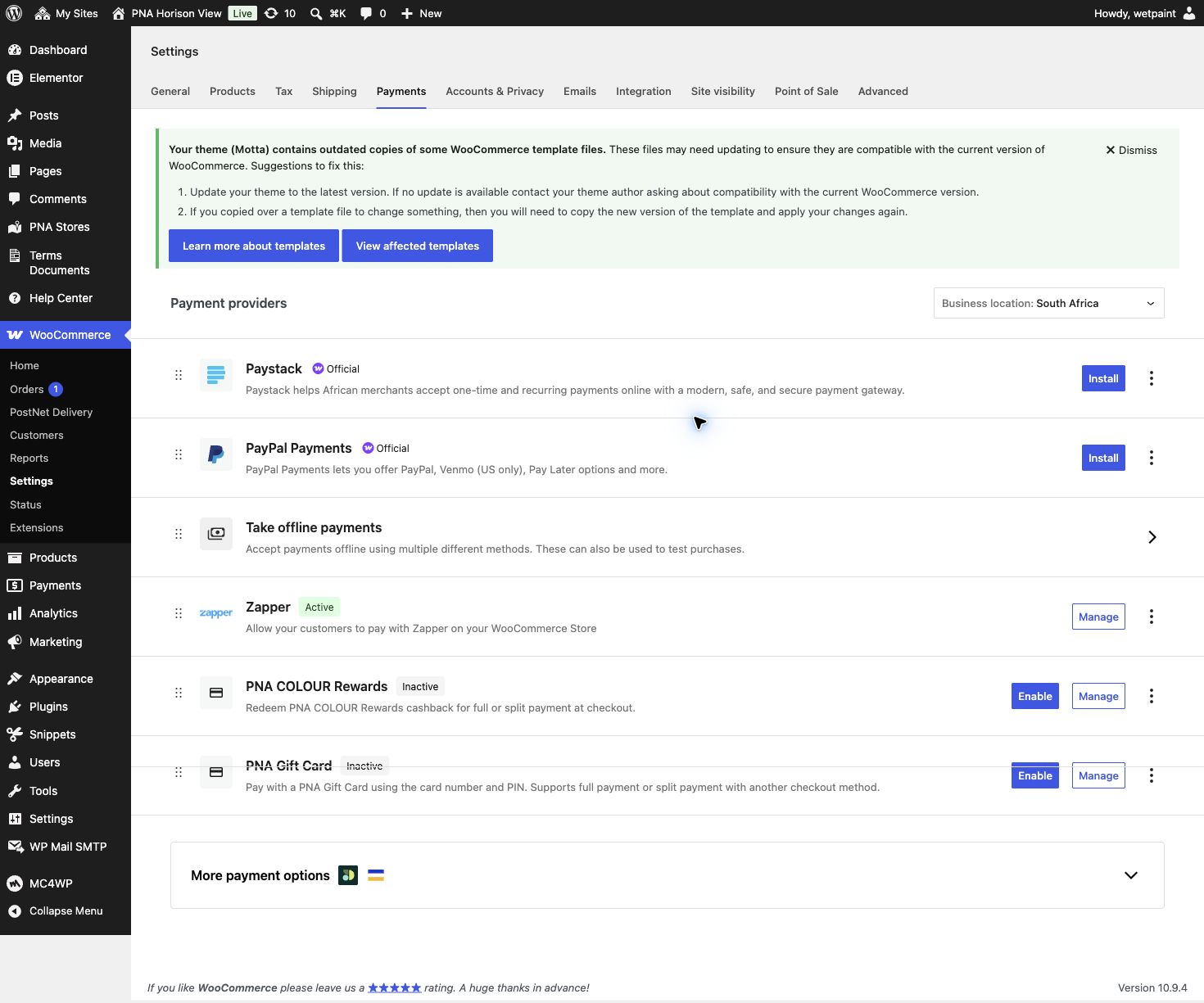
Store configuration requires remediation. PNA Horison View WooCommerce settings · authenticated administrator session · 19 Aug 2026. Zapper is the only active gateway shown, while WooCommerce reports outdated Motta template overrides.
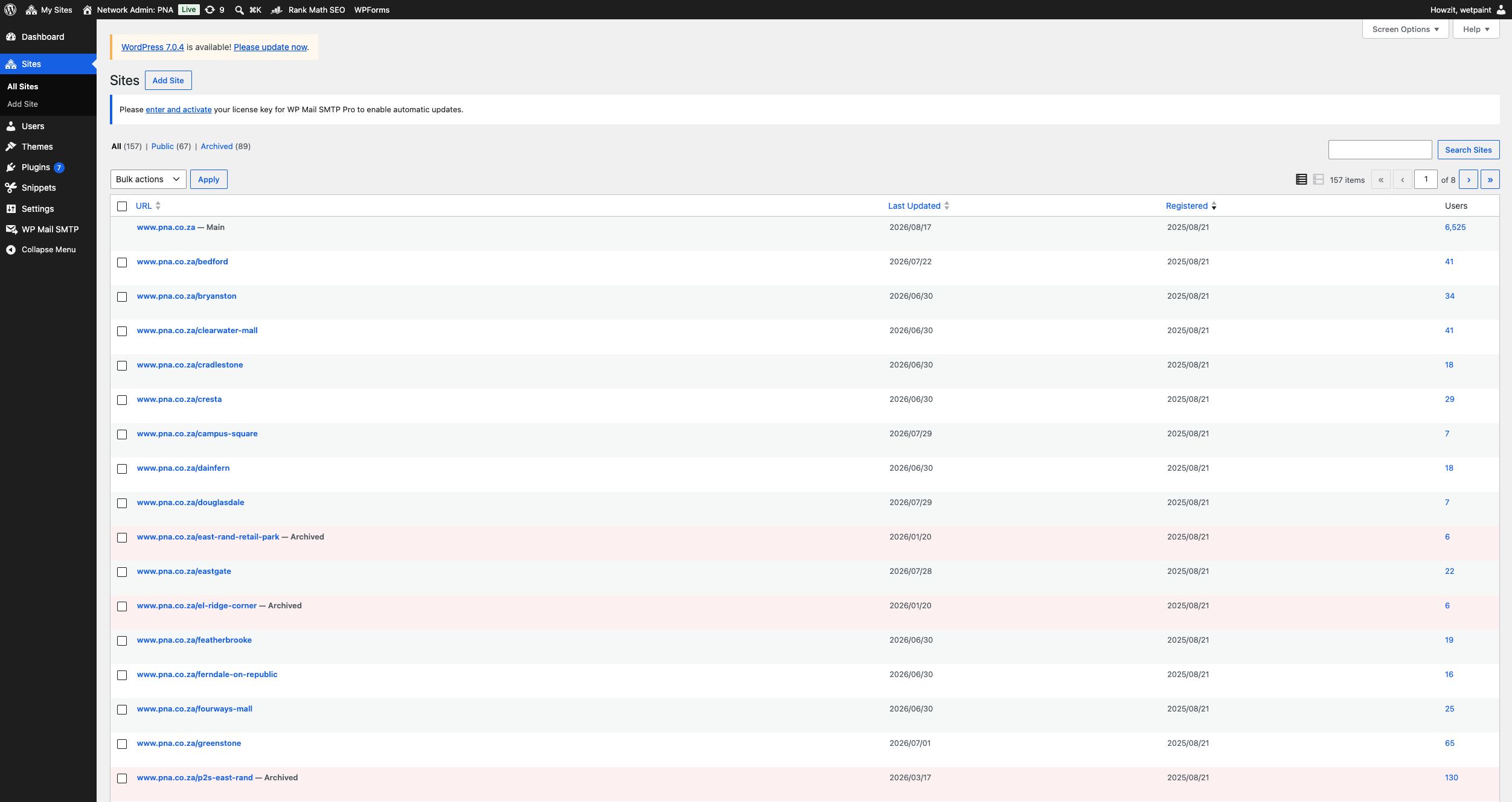
The Multisite network increased to 157 sites. wp-admin/network/sites.php · Network Admin · 18 Aug 2026. The live register shows 157 total sites, 67 public and 89 archived, compared with 154 total on 14 August. This confirms active change and the need for store-creation, archive, indexing, QA and release governance.
Platform maintenance and dependency backlog. wp-admin/network/plugins.php · Network Admin · 18 Aug 2026. WordPress 7.0.4 and seven plugin updates are available, including PostNet 1.0.15. Kirki and Meta Box are inactive while Motta reports them as required. Update and dependency testing must happen in staging with backup and rollback.
Page-level SEO coverage is inconsistent. wp-admin/edit.php?post_type=page · authenticated desktop session · 18 Aug 2026. Multiple published pages show a Rank Math score of N/A, no focus keyword and mixed schema settings. The visible No Index notice links to the Boskruin coming-soon subsite; the main pna.co.za indexing checkbox was separately verified as unchecked.
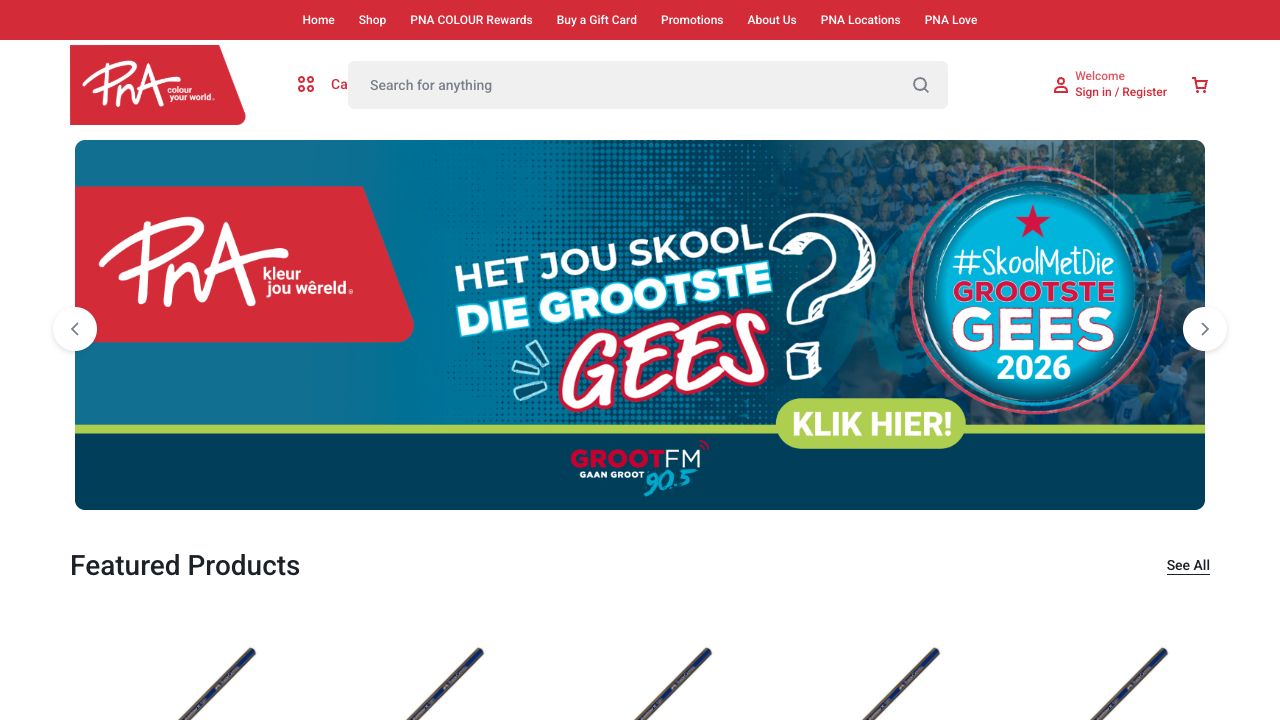
Live homepage and navigation. pna.co.za · desktop Chrome · 19 Aug 2026. PNA branding, search, account and campaign content are prominent, while the relationship between Shop, Categories, PNA Locations and store-based fulfilment is not explained.
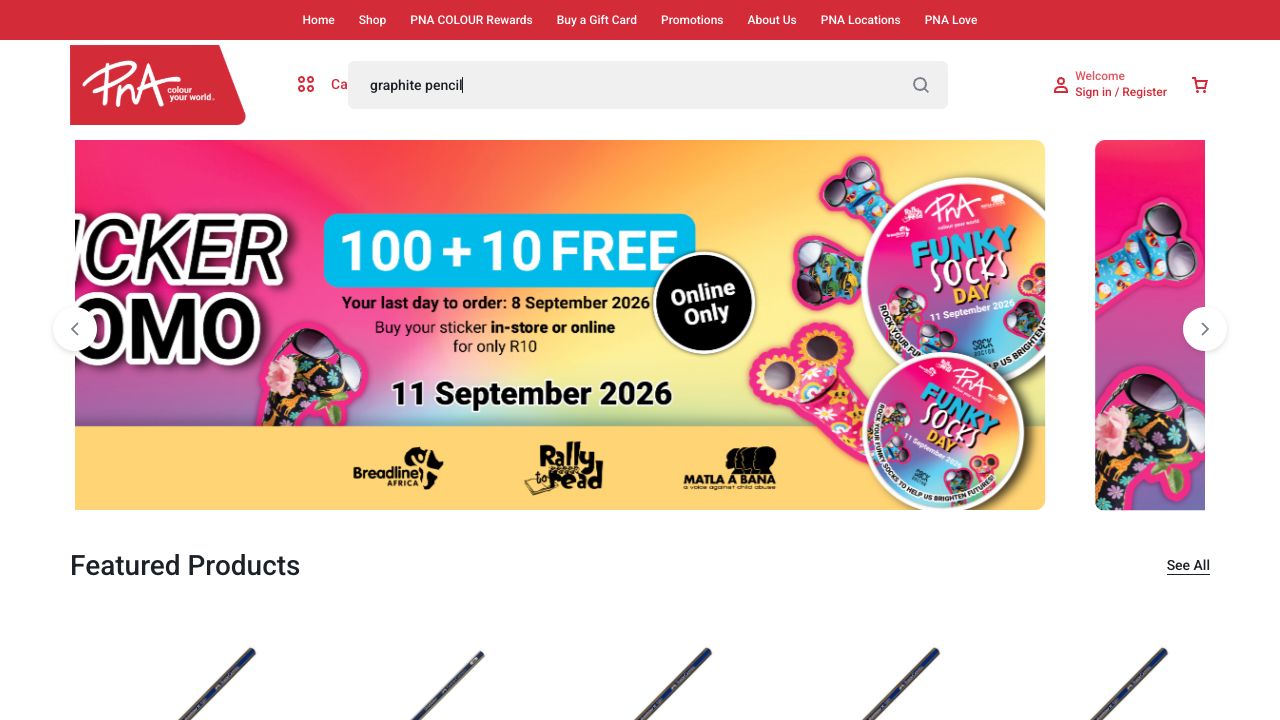
Search query without visible predictive help. pna.co.za · desktop Chrome · 19 Aug 2026. Entering “graphite pencil” produced no visible predictive products, categories or spelling assistance in the captured state.
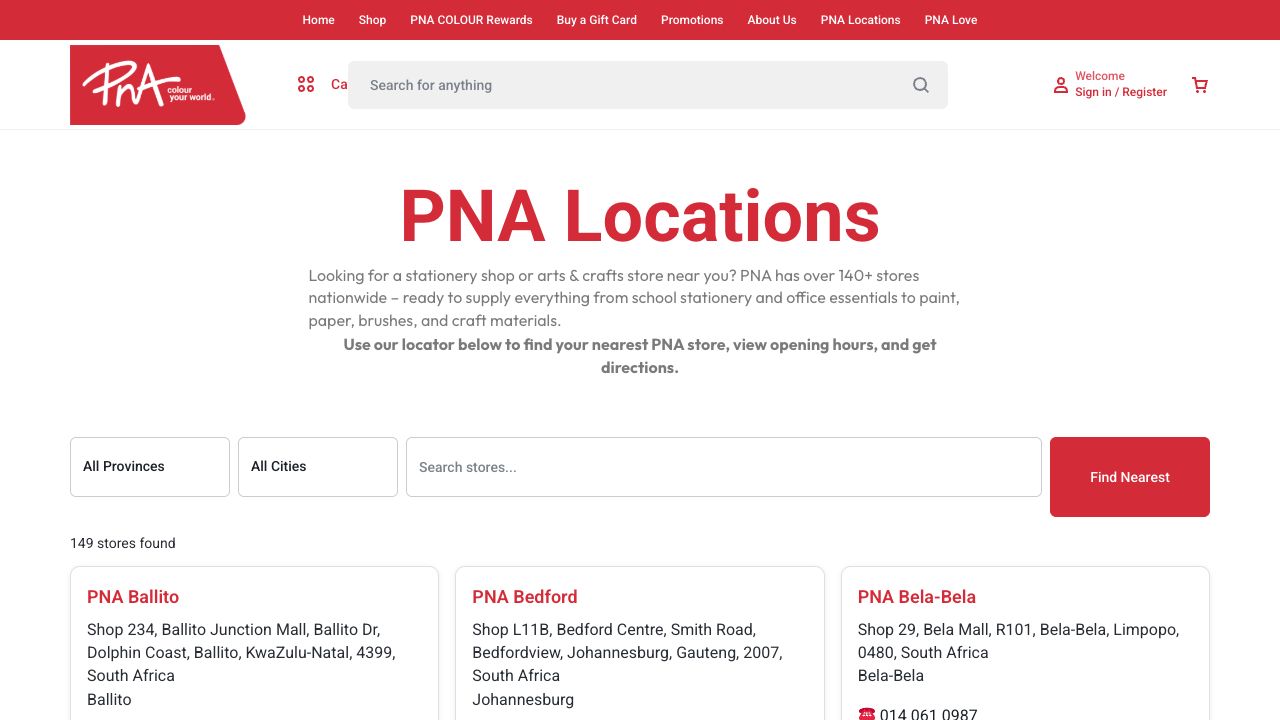
Store locator is a useful existing component. pna.co.za/pna-locations/ · desktop Chrome · 19 Aug 2026. The locator provides province, city, free-text and nearest-store controls and lists 149 stores; it should be connected more clearly to online fulfilment.

No purchase path from a generic product page. pna.co.za/product/goldfaber-graphite-pencil-2h/ · desktop Chrome, authenticated session · 14 Aug 2026. Repro: open any generic (non-store-scoped) product URL — price and stock show, but there is no add-to-cart control or quantity selector anywhere on the page.

"Collect at PostNet" checkout error. pna.co.za/rivonia-village/checkout/ · desktop Chrome, authenticated session, store selected, item in cart · 14 Aug 2026. Repro: select "Ship" delivery at checkout with the default "Collect at PostNet" option — the store list fails with "Error loading stores: Invalid store data received," and Retry does not resolve it. (Also visible: Zapper is the only payment method offered.)

Earlier network capture: 154 WordPress Multisite sites. wp-admin/network/sites.php · logged in as a Network Admin · 14 Aug 2026. Shows the "Main" network site plus separate store subsites and provides the earlier baseline. The current evidence above shows the network increased to 157 sites four days later, strengthening the governance requirement.

Historical GA4 purchase journey showed 100% recorded drop-off. GA4 property "PNA Website - GA4" · 1 May–31 Jul 2026 · reviewed 14 Aug 2026. This is retained as earlier baseline evidence. The newly configured 18 August reports now record product, cart and checkout-start activity, but still no delivery, payment or purchase completion.

GA4 Generate leads overview: 491k new users, 66k returning, 0 qualified leads. GA4 property "PNA Website - GA4" · 1 May–31 Jul 2026 · reviewed 14 Aug 2026. Confirms the audience values recorded in this report; it does not by itself validate the e-commerce funnel.

GA4 Monetisation overview: R0.00 total revenue, 0 purchasers. GA4 property "PNA Website - GA4" · 1 May–31 Jul 2026 · reviewed 14 Aug 2026. Total revenue, purchase revenue and ad revenue all read R0.00 for the full three-month window, with 0 total and 0 first-time purchasers.